Loading...
mc.networkforgamers.com
Click to copy IP

Welcome to Network for Gamers. Please read our Wiki and FAQ's to learn about our server features and answer many common questions.
Click on the Wiki category drop-down arrows on the left where you can scroll down for additional pages in each category.
We hope you enjoy your stay!

Welcome to Network for Gamers. Please read our Wiki and FAQ's to learn about our server features and answer many common questions.
Click on the Wkiki category drop-down arrows on the left where you can scroll down for additional pages in each category.
We hope you enjoy your stay!
For information on our Ranks and Perks, please visit our Store at: https://minecraft.networkforgamers.com/store/
Gameplay Features:
RPG and Dungeons
Playstyles / Classes
PvP and Guilds
Skills and Progression
Land Claiming
Economy (Auction, Jobs, Shops)
Crates and Cosmetics all attainable through gameplay
Custom Recipes
Random Teleport
Pocket Horses
Player Warps
Kits
...and more!
Server address is: mc.networkforgamers.com
NFG MC RPG Survival Server
Basic World Information
Server Rules as of June 2026. NOTE: Server rules will be updated as needed.
Be respectful, play fair, and help us keep the community fun.
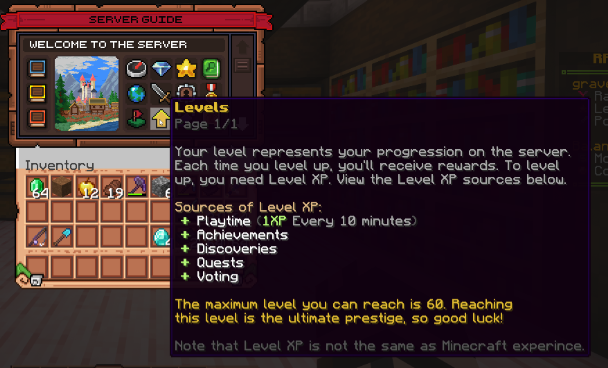
Your level represents your progression on the server where gameplay is like other RPG games.
Note that many questions can be answered by typing in game chat chat: /serverguide
Each time you level up, you will receive rewards.
You can see your level progression by typing in chat: /levels
To level up, you need Level XP which can be gained in the following ways.
Playtime (1xp every 10 minutes)
Achievements
Discoveries
Quests
Recipes for custom tools
Voting
to receive 2nd Job XP, in-game money, and perks.
to receive 3rd Job XP, in-game money, and perks.
Mod Name |
Allowed |
Controlledeither we control the mod server side or have a server side equivelent |
| Xearos Minimap | ✔️ | ✔️ |
| Xearos World Map | ✔️ | ✔️ |
| Journy Map | ✔️ | ✔️ |
| Voxel Map | ✔️ | ✔️ |
| ArmorStatusHUD | ✔️ | ❌ |
| DirectionHUD | ❌ | ✔️ |
| StatusEffectHUD | ✔️ | ❌ |
| ChatLog | ✔️ | ✔️ |
| Too Many Items | ❌ | ❌ |
| Not Enough Items | ❌ | ❌ |
| Shaders | ✔️ | ❌ |
| CPS MOD | ✔️ | ❌ |
| MotionBlurMod | ✔️ | ❌ |
| Toggle Sneak or Toggle Sprint | ✔️ | ✔️ |
| Chat Macros | ❌ | ❌ |
| MouseFixDelay | ✔️ | ✔️ |
| Sprinting While Sneaking | ❌ | ❌ |
| World Downloaders | ❌ | ❌ |
| Macros | ❌ | ❌ |
| Autoclickers | ❌ | ❌ |
|
Skin Blinkers |
❌ | ❌ |
| MouseTweaks | ❌ | ❌ |
| Inventory Tweaks | ❌ | ❌ |
Players can Vote on the following websites to support our Server.
Players will receive 1 (one) Vote key for each vote.
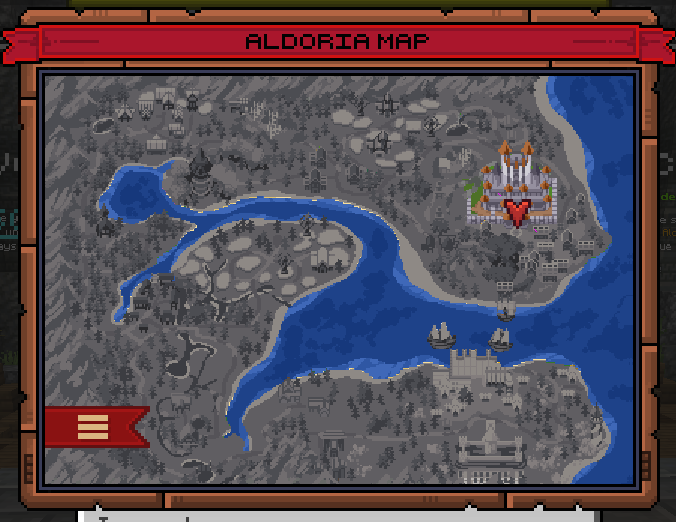
Spawn features Crates, Dungeons, Jobs, Vendors, PvP areas, Auction House, Quests, Equipment Upgrades, Smelting, Pocket Horses, and more.
Since this is an RPG server, we recommend that players invest time into exploring Spawn and interacting with the NPC's there before choosing their primary Trait and Job.
This will benefit players who learn to utilize the NPC's to their benefit and profit in the play world.
NPC's can develop moods when they have too much work to do, which affects the prices they offer.
NPC's who sell various items and offer quests will refresh and restock in the following way:
NFG MC RPG Survival Villagers
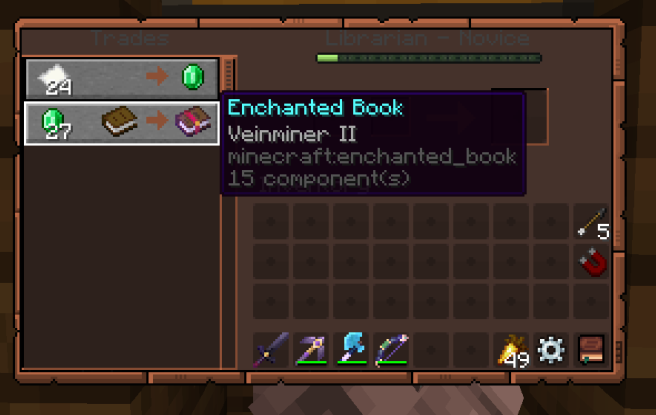
Villager Custom Enchantment Trade Example
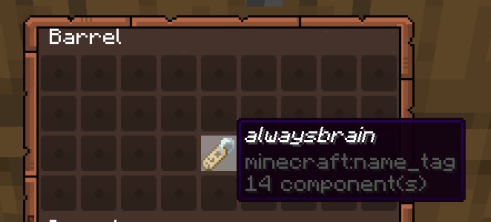
Villager Auto Farmer - Name Tag Example
Villager Auto Farmer Renamed - Example

Player Profile (/profile)

Skill Tree (/skilltree)

Skill Tree Guide
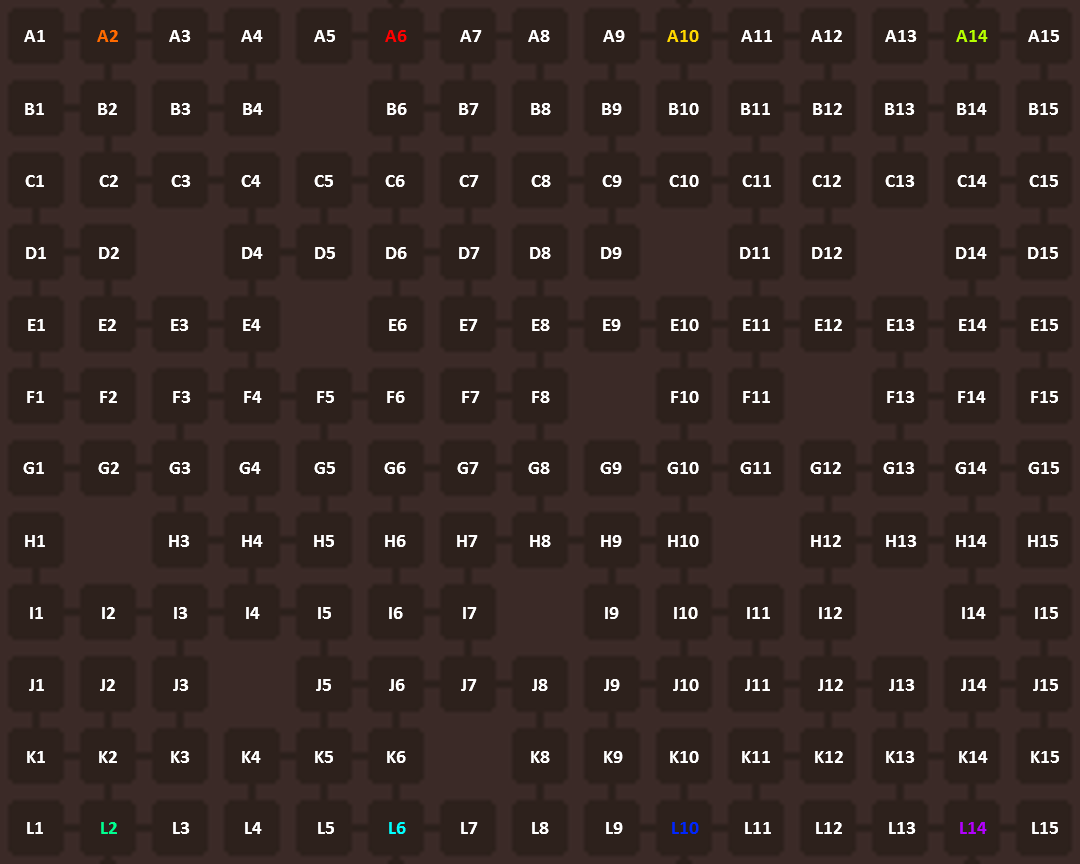
Skill Tree Guide (sorted by location on /skilltree)
| GRID TOP | GRID LEFT | TYPE | DESCRIPTION | LEVEL | MULTIPLIER |
| A | 1 | Trait | Trailblazer | Bronze | |
| A | 2 | Trait | Pathfinder | Bronze | |
| A | 3 | Stat | Speed | +5 | |
| A | 4 | Trait | Cartographer | Silver | |
| A | 5 | Recipe | Iron Ore Hammer | ||
| A | 6 | Trait | Negotiator | Bronze | |
| A | 7 | Stat | Mining Speed | +5 | |
| A | 8 | Trait | Negotiator | Silver | |
| A | 9 | Trait | Archeologist | Bronze | |
| A | 10 | Trait | Ore Prospector | Bronze | |
| A | 11 | Trait | Agriculture | Bronze | |
| A | 12 | Recipe | Botanic Fertilizer | ||
| A | 13 | Trait | Wayfarer | Bronze | |
| A | 14 | Trait | Artisan | Bronze | |
| A | 15 | Recipe | Iron Chisel | ||
| B | 1 | Recipe | Iron Spear | ||
| B | 2 | Recipe | Adventurer Noter | ||
| B | 3 | Trait | Cartographer | Master | |
| B | 4 | Trait | Pathfinder | Gold | |
| B | 5 | EMPTY | EMPTY | EMPTY | |
| B | 6 | Trait | Trader | ||
| B | 7 | Trait | Diamond Seeker | Bronze | |
| B | 8 | Trait | Negotiator | Gold | |
| B | 9 | Stat | Wisdom | ||
| B | 10 | Recipe | Aldorite Ingot | ||
| B | 11 | Trait | Herbalist | Bronze | |
| B | 12 | Trait | Agriculture | Silver | |
| B | 13 | Trait | Toolsmith | Bronze | |
| B | 14 | Recipe | Portable Crafter | ||
| B | 15 | Trait | Artisan | Silver | |
| C | 1 | Trait | Trailblazer | Master | |
| C | 2 | Trait | Trailblazer | Silver | |
| C | 3 | Stat | Resilience | +5 | |
| C | 4 | Trait | Olympic Swimmer | Bronze | |
| C | 5 | Trait | Loot Slayer | Bronze | |
| C | 6 | Recipe | Diamond Sickle | ||
| C | 7 | Trait | Trader | Silver | |
| C | 8 | Recipe | Netherite Clever | ||
| C | 9 | Trait | Ore Prospector | Silver | |
| C | 10 | Trait | Anti Venom | Bronze | |
| C | 11 | Trait | Leader | ||
| C | 12 | Stat | Health | +5 | |
| C | 13 | Trait | Heavy Miner | Bronze | |
| C | 14 | Trait | Wayfarer | Silver | |
| C | 15 | Stat | Reach | +5 | |
| C | 16 | Trait | Trailblazer | Bronze | |
| D | 1 | Recipe | Diamond Lumber Axe | ||
| D | 2 | Trait | Acrobat | Gold | |
| D | 3 | EMPTY | EMPTY | EMPTY | |
| D | 4 | Trait | Loot Slayer | Silver | |
| D | 5 | Recipe | Drop Magnet | ||
| D | 6 | Trait | Timberwright | Bronze | |
| D | 7 | Stat | Luck | +5 | |
| D | 8 | Recipe | Diamond Ore Hammer | ||
| D | 9 | Trait | Archeologist | Silver | |
| D | 10 | EMPTY | EMPTY | EMPTY | |
| D | 11 | Trait | Herbalist | Silver | |
| D | 12 | Trait | Agriculture | Gold | |
| D | 13 | EMPTY | EMPTY | EMPTY | |
| D | 14 | Trait | Toolsmith | Silver | |
| D | 15 | Trait | Wayfarer | Gold | |
| E | 1 | Trait | Olympic Swimmer | Gold | |
| E | 2 | Stat | Strength | +5 | |
| E | 3 | Trait | Trailblazer | Gold | |
| E | 4 | Trait | Heavy Cutter | ||
| E | 5 | EMPTY | EMPTY | EMPTY | |
| E | 6 | Recipe | Iron Dagger | ||
| E | 7 | Trait | Trader | Gold | |
| E | 8 | Trait | Diamond Seeker | Silver | |
| E | 9 | Trait | Ore Prospector | Gold | |
| E | 10 | Trait | Leader | Silver | |
| E | 11 | Recipe | Plougher | ||
| E | 12 | Trait | Toolsmith | Gold | |
| E | 13 | Stat | Mining Speed | +5 | |
| E | 14 | Recipe | Netherite Chisel | ||
| E | 15 | Trait | Artisan | Gold | |
| F | 1 | Trait | Tracker | Master | |
| F | 2 | Trait | Olympic Swimmer | Master | |
| F | 3 | Trait | Acrobat | Silver | |
| F | 4 | Stat | Speed | +5 | |
| F | 5 | Trait | Loot Slayer | Gold | |
| F | 6 | Trait | Relentless | Master | |
| F | 7 | Trait | Diamond Seeker | Gold | |
| F | 8 | Recipe | Infernium Ingot | ||
| F | 9 | EMPTY | EMPTY | EMPTY | |
| F | 10 | Trait | Herbalist | Gold | |
| F | 11 | Trait | Anti Venom | Silver | |
| F | 12 | EMPTY | EMPTY | EMPTY | |
| F | 13 | Trait | Vampire Healing | Master | |
| F | 14 | Trait | Heavy Miner | Silver | |
| F | 15 | Trait | Wayfarer | Master | |
| G | 1 | Trait | Aquatic Breathing | Master | |
| G | 2 | Trait | Axe Mastery | Gold | |
| G | 3 | Recipe | Infernium Hatchet | ||
| G | 4 | Trait | Relentless | Gold | |
| G | 5 | Recipe | Netherite Excavator | ||
| G | 6 | Stat | Reach | +5 | |
| G | 7 | Trait | Timberwright | Gold | |
| G | 8 | Trait | Enderman Attack | Gold | |
| G | 9 | Trait | Leader | Master | |
| G | 10 | Recipe | Infernium Sword | ||
| G | 11 | Trait | Wizard Enchanting | Master | |
| G | 12 | Trait | Immortal Stomach | Master | |
| G | 13 | Recipe | Diamond Mining Hammer | ||
| G | 14 | Trait | Pack Mule | Master | |
| G | 15 | Recipe | Infernium Pickaxe | ||
| H | 1 | Trait | Tracker | Gold | |
| H | 2 | EMPTY | EMPTY | EMPTY | |
| H | 3 | Trait | Acrobat | Bronze | |
| H | 4 | Trait | Axe Mastery | Silver | |
| H | 5 | Trait | Berserker | Gold | |
| H | 6 | Trait | Timberwright | Master | |
| H | 7 | Stat | Endurance | +5 | |
| H | 8 | Trait | Healing Touch | Silver | |
| H | 9 | Recipe | Aldorite Long Sword | ||
| H | 10 | Trait | Wizard Enchanting | Gold | |
| H | 11 | EMPTY | EMPTY | EMPTY | |
| H | 12 | Trait | Wizard Enchanting | Gold | |
| H | 13 | Stat | Attack Speed | +5 | |
| H | 14 | Trait | Heavy Digger | Silver | |
| H | 15 | Trait | Divine Recovery | Master | |
| I | 1 | Recipe | Aldorite Axe | ||
| I | 2 | Trait | Tracker | Silver | |
| I | 3 | Stat | Resilience | +5 | |
| I | 4 | Trait | Relentless | Silver | |
| I | 5 | Trait | Berserker | Silver | |
| I | 6 | Recipe | Diamond Battle Axe | ||
| I | 7 | Trait | Heavy Cutter | Bronze | |
| I | 8 | EMPTY | EMPTY | EMPTY | |
| I | 9 | Stat | Attack Speed | +5 | |
| I | 10 | Trait | Enderman Attack | Silver | |
| I | 11 | Trait | Battle Stand | Silver | |
| I | 12 | Trait | Immortal Stomach | Gold | |
| I | 13 | EMPTY | EMPTY | EMPTY | |
| I | 14 | Recipe | Netherite Dagger | ||
| I | 15 | Stat | Luck | +5 | |
| J | 1 | Trait | Iron Fist | Master | |
| J | 2 | Trait | Pack Mule | Gold | |
| J | 3 | Trait | Tracker | Bronze | |
| J | 4 | EMPTY | EMPTY | EMPTY | |
| J | 5 | Trait | Sword Mastery | Silver | |
| J | 6 | Stat | Strength | +5 | |
| J | 7 | Trait | Gladiator | Silver | |
| J | 8 | Recipe | Diamond Long Sword | ||
| J | 9 | Trait | Enderman Attack | Bronze | |
| J | 10 | Trait | Orbsorber | Gold | |
| J | 11 | Recipe | Enchanting Steak | ||
| J | 12 | Trait | Vampire Healing | Silver | |
| J | 13 | Trait | Immortal Stomach | Silver | |
| J | 14 | Trait | Divine Recovery | Silver | |
| J | 15 | Recipe | Suicide Bomb | ||
| K | 1 | Trait | Iron Fist | Silver | |
| K | 2 | Trait | Pack Mule | Bronze | |
| K | 3 | Recipe | Diamond Hatchet | ||
| K | 4 | Trait | Axe Mastery | Bronze | |
| K | 5 | Recipe | Iron Battle Axe | ||
| K | 6 | Trait | Gladiator | Bronze | |
| K | 7 | EMPTY | EMPTY | EMPTY | |
| K | 8 | Trait | Shield Recovery | Bronze | |
| K | 9 | Trait | Orbsorber | Silver | |
| K | 10 | Recipe | Silicifier | ||
| K | 11 | Trait | Vampire Healing | Bronze | |
| K | 12 | Trait | Wizard Enchanting | Silver | |
| K | 13 | Trait | Battle Stand | Bronze | |
| K | 14 | Recipe | Golden Steak | ||
| K | 15 | Trait | Divine Recovery | Gold | |
| L | 1 | Recipe | Oxygen Bottle | ||
| L | 2 | Trait | Relentless | Bronze | |
| L | 3 | Stat | Endurance | +5 | |
| L | 4 | Recipe | Wooden Club | ||
| L | 5 | Trait | Sword Mastery | Bronze | |
| L | 6 | Recipe | Aldorite Sword | ||
| L | 7 | Trait | Berserker | Bronze | |
| L | 8 | Trait | Gladiator | Gold | |
| L | 9 | Stat | Wisdom | +5 | |
| L | 10 | Trait | Orbsorber | Bronze | |
| L | 11 | Trait | Wizard Enchanting | Bronze | |
| L | 12 | Recipe | Diamond Spear | ||
| L | 13 | Trait | Immortal Stomach | Bronze | |
| L | 14 | Trait | Divine Recovery | Bronze | |
| L | 15 | Stat | Health | +5 |
Skill Tree Guide (sorted by Skill Type)
| GRID TOP | GRID LEFT | TYPE | DESCRIPTION | LEVEL | MULTIPLIER |
| A | 5 | Recipe | Iron Ore Hammer | ||
| A | 12 | Recipe | Botanic Fertilizer | ||
| A | 15 | Recipe | Iron Chisel | ||
| B | 1 | Recipe | Iron Spear | ||
| B | 2 | Recipe | Adventurer Noter | ||
| B | 10 | Recipe | Aldorite Ingot | ||
| B | 14 | Recipe | Portable Crafter | ||
| C | 6 | Recipe | Diamond Sickle | ||
| C | 8 | Recipe | Netherite Clever | ||
| D | 1 | Recipe | Diamond Lumber Axe | ||
| D | 5 | Recipe | Drop Magnet | ||
| D | 8 | Recipe | Diamond Ore Hammer | ||
| E | 6 | Recipe | Iron Dagger | ||
| E | 11 | Recipe | Plougher | ||
| E | 14 | Recipe | Netherite Chisel | ||
| F | 8 | Recipe | Infernium Ingot | ||
| G | 3 | Recipe | Infernium Hatchet | ||
| G | 5 | Recipe | Netherite Excavator | ||
| G | 10 | Recipe | Infernium Sword | ||
| G | 13 | Recipe | Diamond Mining Hammer | ||
| G | 15 | Recipe | Infernium Pickaxe | ||
| H | 9 | Recipe | Aldorite Long Sword | ||
| I | 1 | Recipe | Aldorite Axe | ||
| I | 6 | Recipe | Diamond Battle Axe | ||
| I | 14 | Recipe | Netherite Dagger | ||
| J | 8 | Recipe | Diamond Long Sword | ||
| J | 11 | Recipe | Enchanting Steak | ||
| J | 15 | Recipe | Suicide Bomb | ||
| K | 3 | Recipe | Diamond Hatchet | ||
| K | 5 | Recipe | Iron Battle Axe | ||
| K | 10 | Recipe | Silicifier | ||
| K | 14 | Recipe | Golden Steak | ||
| L | 1 | Recipe | Oxygen Bottle | ||
| L | 4 | Recipe | Wooden Club | ||
| L | 6 | Recipe | Aldorite Sword | ||
| L | 12 | Recipe | Diamond Spear | ||
| A | 3 | Stat | Speed | +5 | |
| A | 7 | Stat | Mining Speed | +5 | |
| B | 9 | Stat | Wisdom | ||
| C | 3 | Stat | Resilience | +5 | |
| C | 12 | Stat | Health | +5 | |
| C | 15 | Stat | Reach | +5 | |
| D | 7 | Stat | Luck | +5 | |
| E | 2 | Stat | Strength | +5 | |
| E | 13 | Stat | Mining Speed | +5 | |
| F | 4 | Stat | Speed | +5 | |
| G | 6 | Stat | Reach | +5 | |
| H | 7 | Stat | Endurance | +5 | |
| H | 13 | Stat | Attack Speed | +5 | |
| I | 3 | Stat | Resilience | +5 | |
| I | 9 | Stat | Attack Speed | +5 | |
| I | 15 | Stat | Luck | +5 | |
| J | 6 | Stat | Strength | +5 | |
| L | 3 | Stat | Endurance | +5 | |
| L | 9 | Stat | Wisdom | +5 | |
| L | 15 | Stat | Health | +5 | |
| A | 1 | Trait | Trailblazer | Bronze | |
| A | 2 | Trait | Pathfinder | Bronze | |
| A | 4 | Trait | Cartographer | Silver | |
| A | 6 | Trait | Negotiator | Bronze | |
| A | 8 | Trait | Negotiator | Silver | |
| A | 9 | Trait | Archeologist | Bronze | |
| A | 10 | Trait | Ore Prospector | Bronze | |
| A | 11 | Trait | Agriculture | Bronze | |
| A | 13 | Trait | Wayfarer | Bronze | |
| A | 14 | Trait | Artisan | Bronze | |
| B | 3 | Trait | Cartographer | Master | |
| B | 4 | Trait | Pathfinder | Gold | |
| B | 6 | Trait | Trader | ||
| B | 7 | Trait | Diamond Seeker | Bronze | |
| B | 8 | Trait | Negotiator | Gold | |
| B | 11 | Trait | Herbalist | Bronze | |
| B | 12 | Trait | Agriculture | Silver | |
| B | 13 | Trait | Toolsmith | Bronze | |
| B | 15 | Trait | Artisan | Silver | |
| C | 1 | Trait | Trailblazer | Master | |
| C | 2 | Trait | Trailblazer | Silver | |
| C | 4 | Trait | Olympic Swimmer | Bronze | |
| C | 5 | Trait | Loot Slayer | Bronze | |
| C | 7 | Trait | Trader | Silver | |
| C | 9 | Trait | Ore Prospector | Silver | |
| C | 10 | Trait | Anti Venom | Bronze | |
| C | 11 | Trait | Leader | ||
| C | 13 | Trait | Heavy Miner | Bronze | |
| C | 14 | Trait | Wayfarer | Silver | |
| C | 16 | Trait | Trailblazer | Bronze | |
| D | 2 | Trait | Acrobat | Gold | |
| D | 4 | Trait | Loot Slayer | Silver | |
| D | 6 | Trait | Timberwright | Bronze | |
| D | 9 | Trait | Archeologist | Silver | |
| D | 11 | Trait | Herbalist | Silver | |
| D | 12 | Trait | Agriculture | Gold | |
| D | 14 | Trait | Toolsmith | Silver | |
| D | 15 | Trait | Wayfarer | Gold | |
| E | 1 | Trait | Olympic Swimmer | Gold | |
| E | 3 | Trait | Trailblazer | Gold | |
| E | 4 | Trait | Heavy Cutter | ||
| E | 7 | Trait | Trader | Gold | |
| E | 8 | Trait | Diamond Seeker | Silver | |
| E | 9 | Trait | Ore Prospector | Gold | |
| E | 10 | Trait | Leader | Silver | |
| E | 12 | Trait | Toolsmith | Gold | |
| E | 15 | Trait | Artisan | Gold | |
| F | 1 | Trait | Tracker | Master | |
| F | 2 | Trait | Olympic Swimmer | Master | |
| F | 3 | Trait | Acrobat | Silver | |
| F | 5 | Trait | Loot Slayer | Gold | |
| F | 6 | Trait | Relentless | Master | |
| F | 7 | Trait | Diamond Seeker | Gold | |
| F | 10 | Trait | Herbalist | Gold | |
| F | 11 | Trait | Anti Venom | Silver | |
| F | 13 | Trait | Vampire Healing | Master | |
| F | 14 | Trait | Heavy Miner | Silver | |
| F | 15 | Trait | Wayfarer | Master | |
| G | 1 | Trait | Aquatic Breathing | Master | |
| G | 2 | Trait | Axe Mastery | Gold | |
| G | 4 | Trait | Relentless | Gold | |
| G | 7 | Trait | Timberwright | Gold | |
| G | 8 | Trait | Enderman Attack | Gold | |
| G | 9 | Trait | Leader | Master | |
| G | 11 | Trait | Wizard Enchanting | Master | |
| G | 12 | Trait | Immortal Stomach | Master | |
| G | 14 | Trait | Pack Mule | Master | |
| H | 1 | Trait | Tracker | Gold | |
| H | 3 | Trait | Acrobat | Bronze | |
| H | 4 | Trait | Axe Mastery | Silver | |
| H | 5 | Trait | Berserker | Gold | |
| H | 6 | Trait | Timberwright | Master | |
| H | 8 | Trait | Healing Touch | Silver | |
| H | 10 | Trait | Wizard Enchanting | Gold | |
| H | 12 | Trait | Wizard Enchanting | Gold | |
| H | 14 | Trait | Heavy Digger | Silver | |
| H | 15 | Trait | Divine Recovery | Master | |
| I | 2 | Trait | Tracker | Silver | |
| I | 4 | Trait | Relentless | Silver | |
| I | 5 | Trait | Berserker | Silver | |
| I | 7 | Trait | Heavy Cutter | Bronze | |
| I | 10 | Trait | Enderman Attack | Silver | |
| I | 11 | Trait | Battle Stand | Silver | |
| I | 12 | Trait | Immortal Stomach | Gold | |
| J | 1 | Trait | Iron Fist | Master | |
| J | 2 | Trait | Pack Mule | Gold | |
| J | 3 | Trait | Tracker | Bronze | |
| J | 5 | Trait | Sword Mastery | Silver | |
| J | 7 | Trait | Gladiator | Silver | |
| J | 9 | Trait | Enderman Attack | Bronze | |
| J | 10 | Trait | Orbsorber | Gold | |
| J | 12 | Trait | Vampire Healing | Silver | |
| J | 13 | Trait | Immortal Stomach | Silver | |
| J | 14 | Trait | Divine Recovery | Silver | |
| K | 1 | Trait | Iron Fist | Silver | |
| K | 2 | Trait | Pack Mule | Bronze | |
| K | 4 | Trait | Axe Mastery | Bronze | |
| K | 6 | Trait | Gladiator | Bronze | |
| K | 8 | Trait | Shield Recovery | Bronze | |
| K | 9 | Trait | Orbsorber | Silver | |
| K | 11 | Trait | Vampire Healing | Bronze | |
| K | 12 | Trait | Wizard Enchanting | Silver | |
| K | 13 | Trait | Battle Stand | Bronze | |
| K | 15 | Trait | Divine Recovery | Gold | |
| L | 2 | Trait | Relentless | Bronze | |
| L | 5 | Trait | Sword Mastery | Bronze | |
| L | 7 | Trait | Berserker | Bronze | |
| L | 8 | Trait | Gladiator | Gold | |
| L | 10 | Trait | Orbsorber | Bronze | |
| L | 11 | Trait | Wizard Enchanting | Bronze | |
| L | 13 | Trait | Immortal Stomach | Bronze | |
| L | 14 | Trait | Divine Recovery | Bronze |
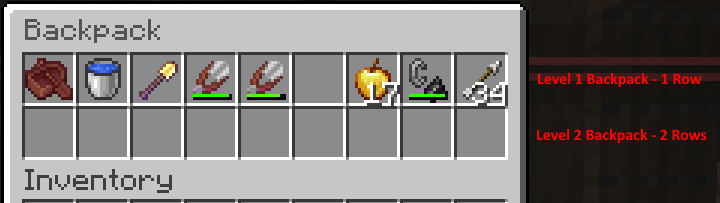
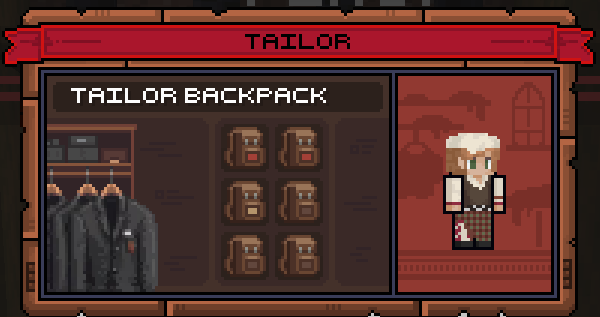
Our server features Backpacks for players to used to supplement the limited Enderchest size.
Recipes are unlocked as players gain experience through playing on the server. These can include vanilla items and/or custom items such as Aldorite and Infernium.
These Recipes include items that make mining, cutting trees, and tools that are an improvement over or enhance vanilla items.
See a list of custom recipes below. The actual recipes can be viewed in your Player Profile.
Aldorite and Infernium Ingots are only found in Crates while the powders and crystals are only found by completing in the Dungeons in Spawn.
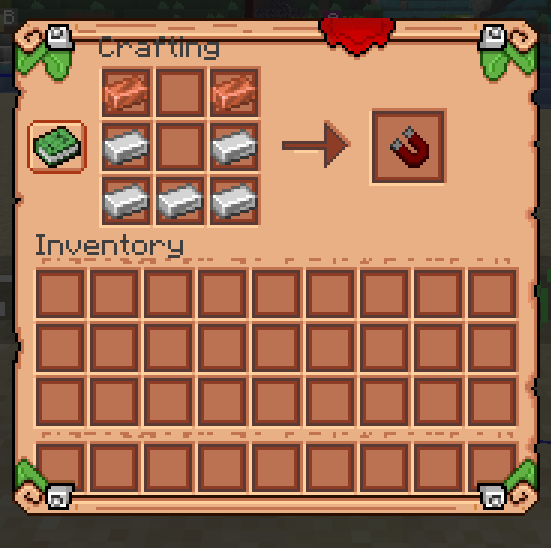
Players can preview custom recipes through their Player Profile (/profile) and clicking on the green recipe book in the GUI.

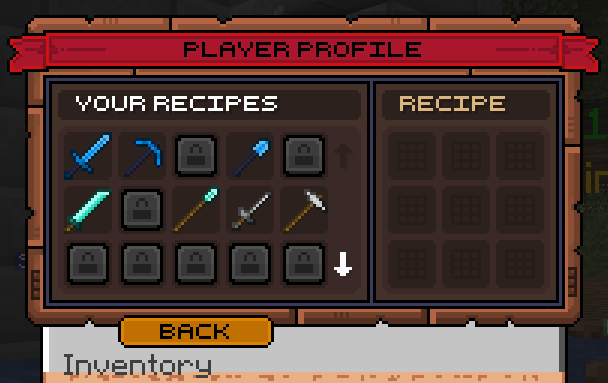
Recipe Example: Drop Magnet (moves most items directly to Player inventory)
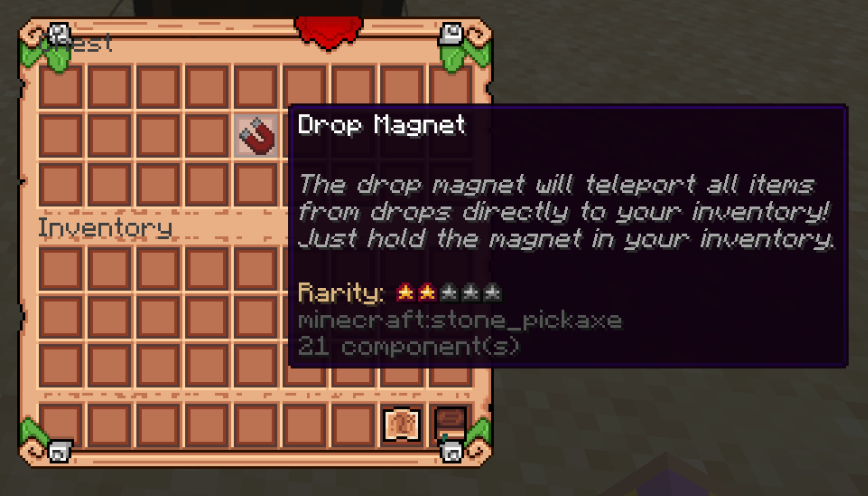
Drop Magnet Recipe:
| ITEM LIST |
| Axe |
| Battle Axe |
| Chisel |
| Cleaver |
| Club |
| Dagger |
| Drop Magnet |
| Drum |
| Excavator |
| Fertilizer |
| Flute |
| Guitar |
| Harp |
| Hatchet |
| Hoe |
| Long Sword |
| Lumber Axe |
| Mining Hammer |
| Ore Hammer |
| Oxygen Bottle |
| Pickaxe |
| Plougher |
| Portable Crafter |
| Shovel |
| Sickle |
| Silicifier |
| Spear |
| Steak (Enchanted & Golden) |
| Suicide Bomb |
| Sword |
| Triangle |
| Whip |
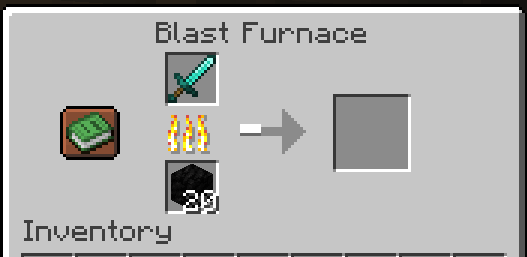
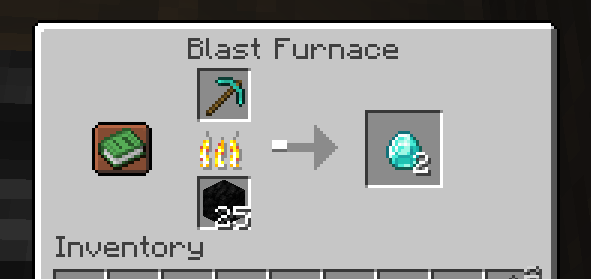
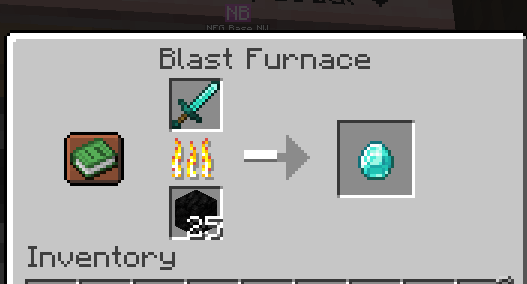
Players can smelt Diamond Axes, Pickaxes, Shovels, and Swords in a Blast Furnace to recover some, but not all, of the Diamonds used to craft them.
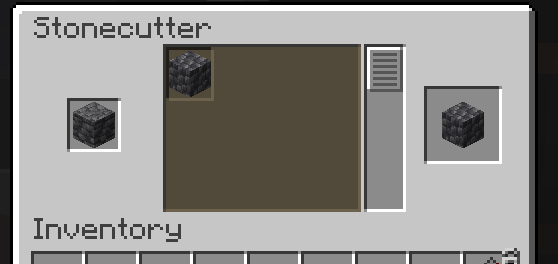
Other recipes include using the Stonecutter to transform Deepslate to Cobbled Deepslate.
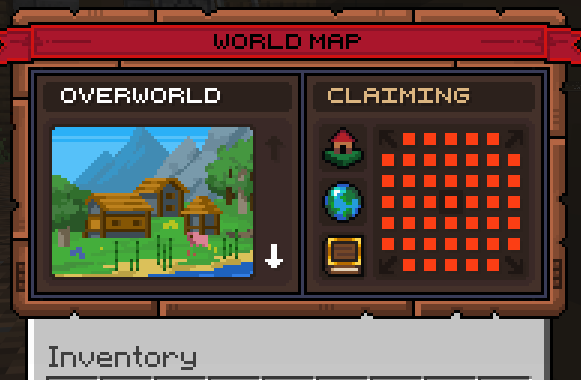
Players can protect their overworld bases and builds with claims.
Claim Management:

There are two public resource farms on the server, one for trees, the other for sand and gravel.
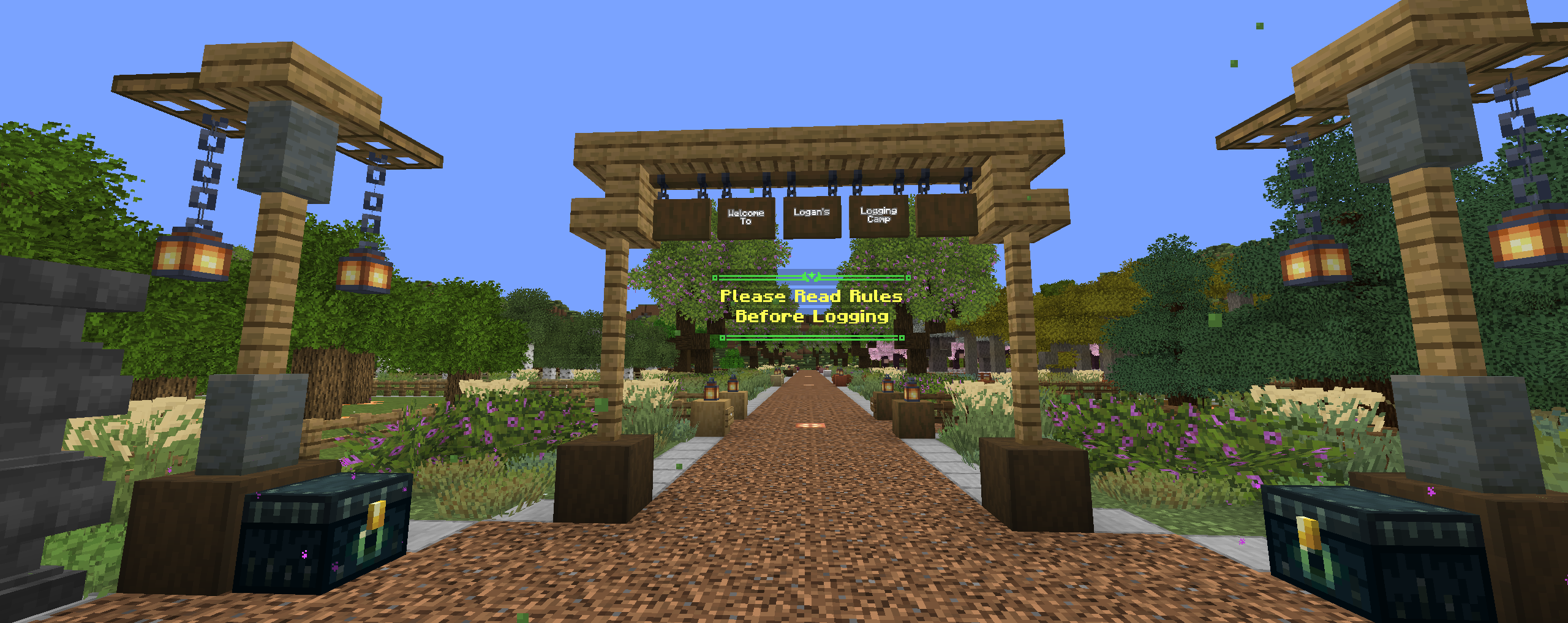
Logan's Logging Camp
Players can cut any tree from Logan's Logging Camp (/pw Logging), but must ask one of the Admins for access to the Nether tree farm which includes a tutorial on its use.
All trees currently in the game can be logged here.
Rules:
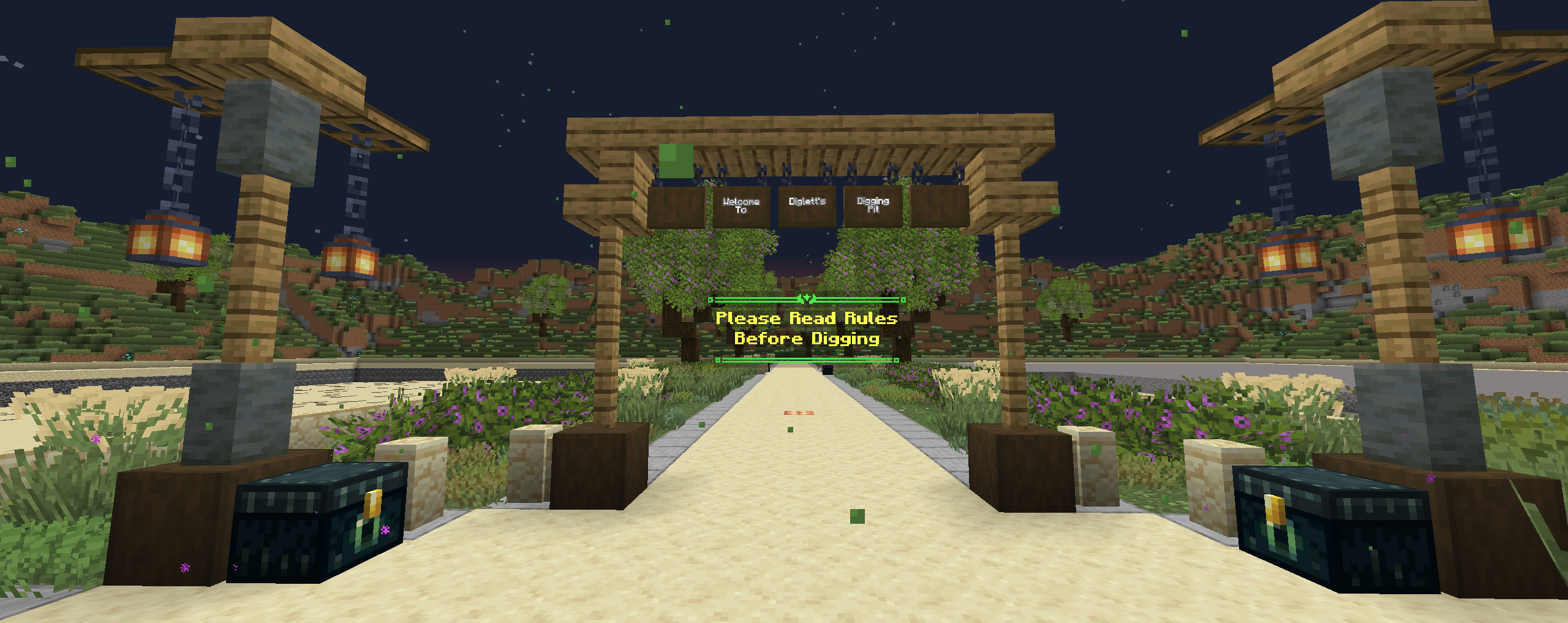
Diglett's Digging Pit
Players can dig Sand and Gravel (/pw Digging) at Diglett's Digging Pit. The Pits reset every fifteen (15) minutes.
Rules:
Redstone in Claims
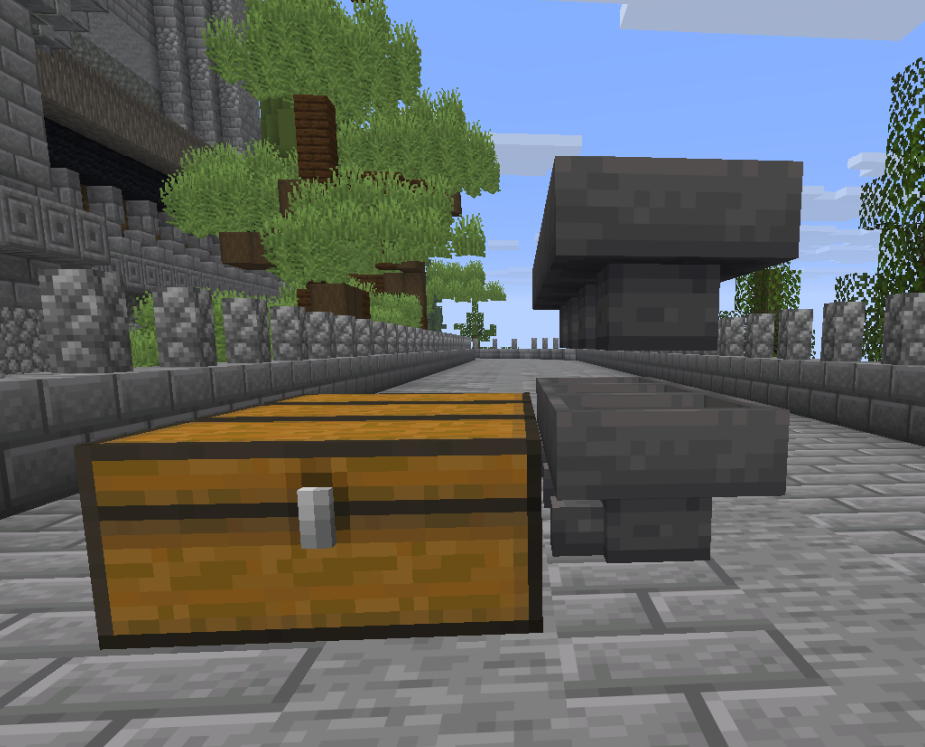
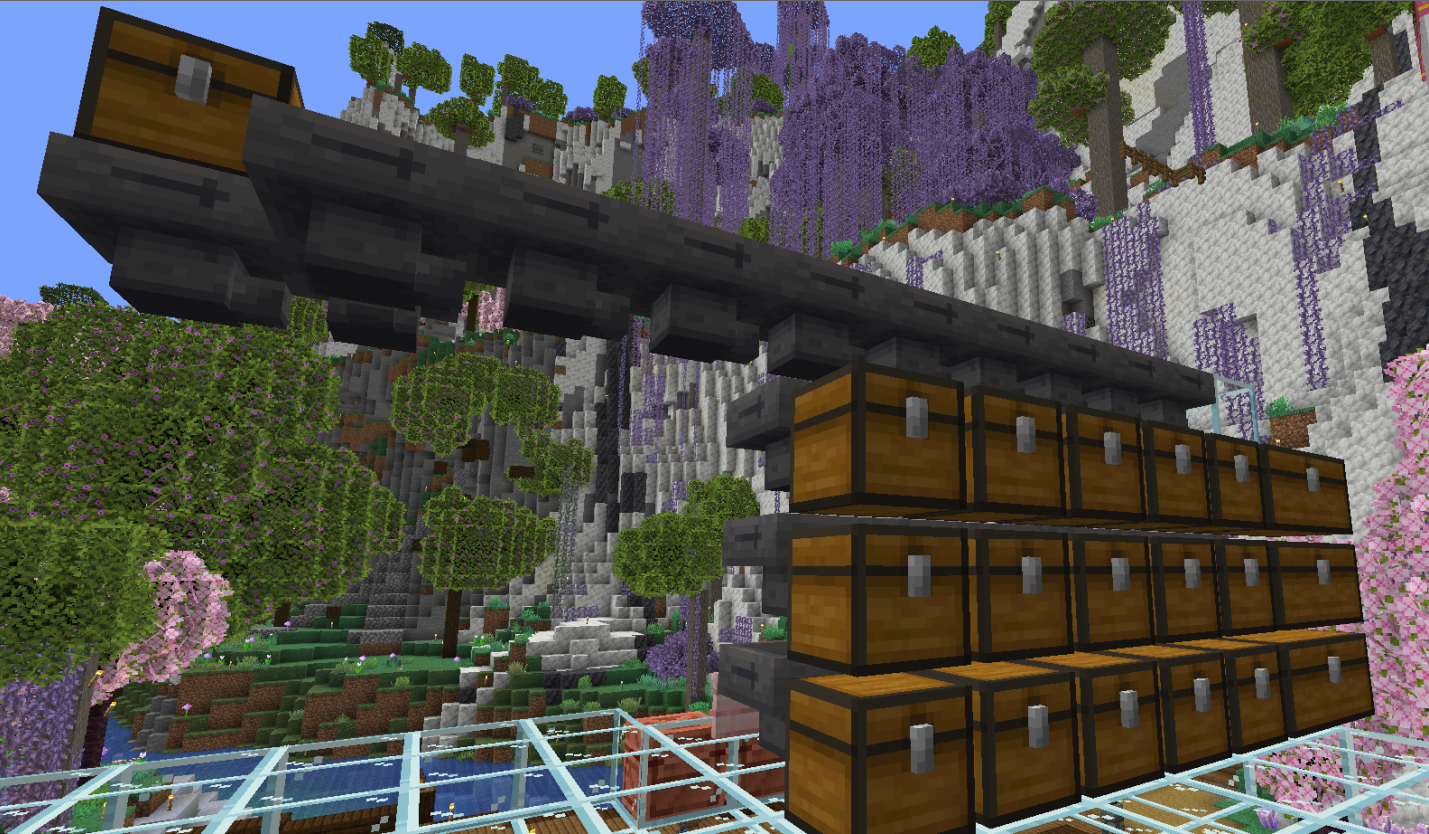
Our server features programable Hoppers that reduce the need for bulky Redstone sorting systems while reducing lag.
Description and example images below:
EXAMPLES BELOW
Standard Sorting System Hopper Line Example:
Standard Sorting System Hopper Line Example - Stacked Chests:
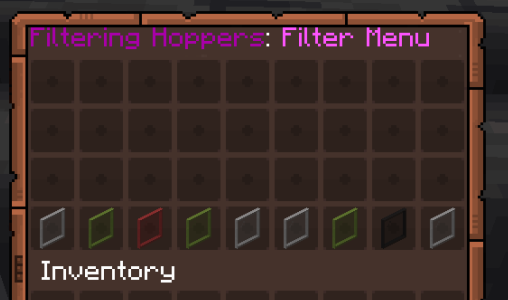
Filtering Hopper GUI:
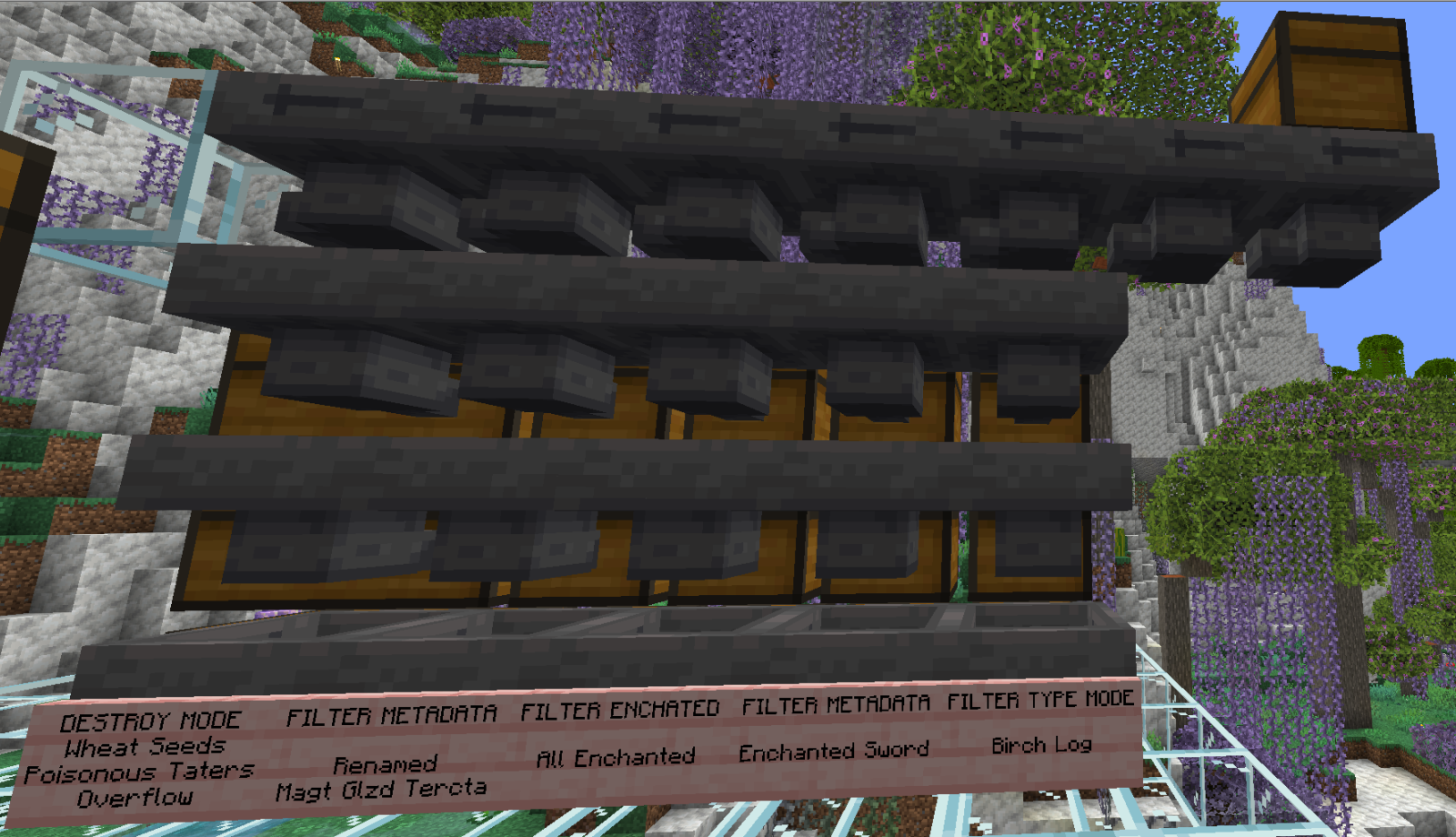
Filter Type / Ignore Type Mode - Click the 2nd Glass Pane from the left - Most commonly used.
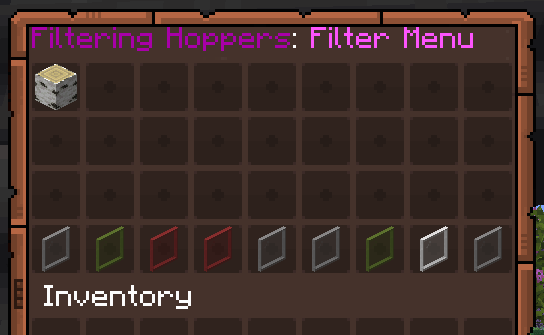
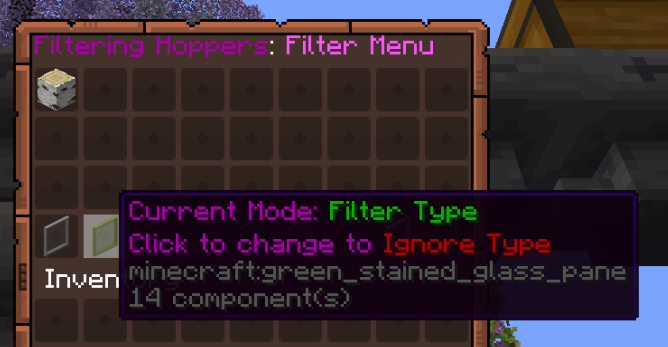
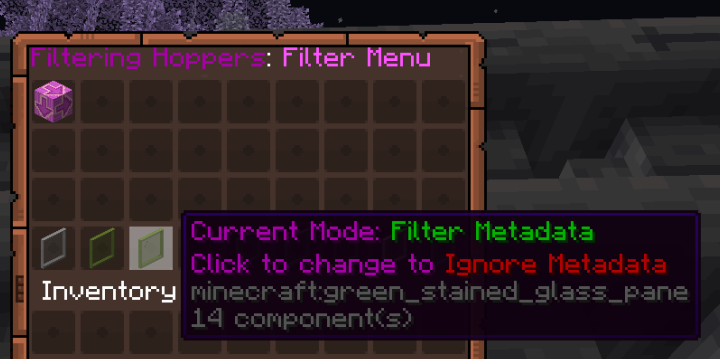
Filter Metadata Mode: Commonly Used to sort for specific Enchanted Tools, Armour, Weapons:
Click the Glass Pane third from the left.
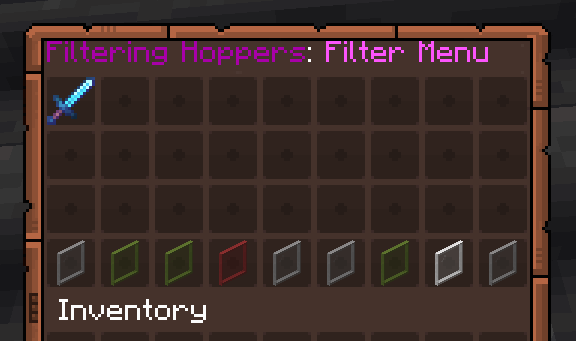
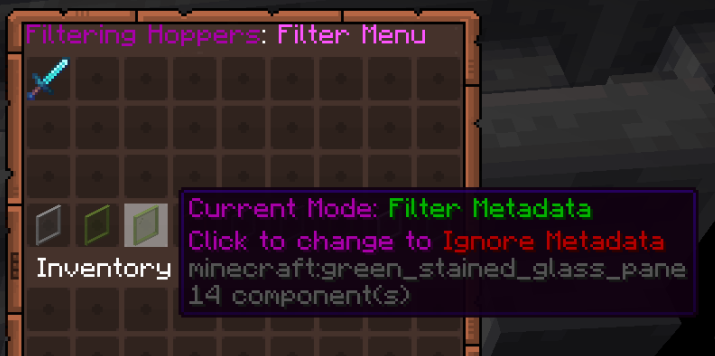
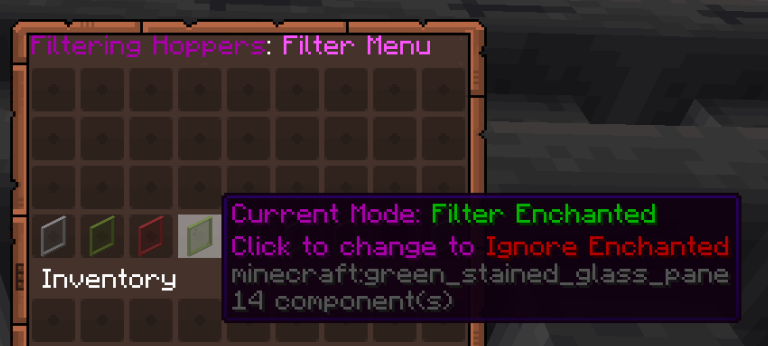
Filter Enchanted Mode: Filters for all Enchanted Items. You must set the filter to BOTH Filter Enchanted Mode and Blacklist Mode.
Click the Glass Pane third from the left and the second Glass Pane from the right.
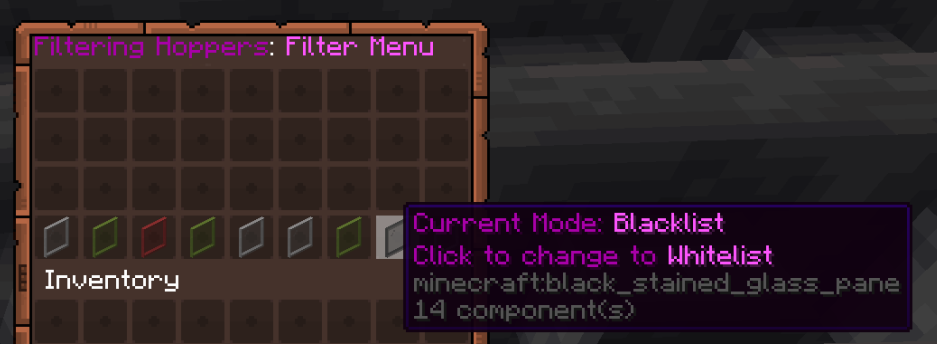
Filtering to Destroy Items: - You must set the filter to BOTH Destroy blocked Items Mode and Blacklist Mode.
Click the Glass Pane third from the right and the Glass Pane second from the right.
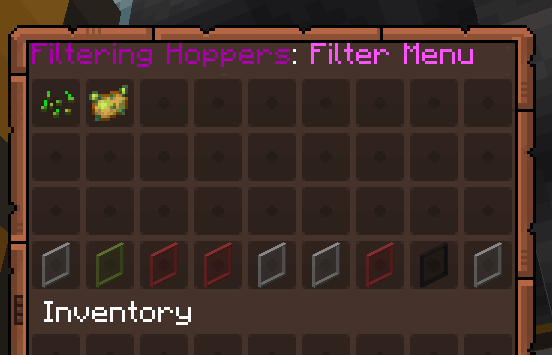
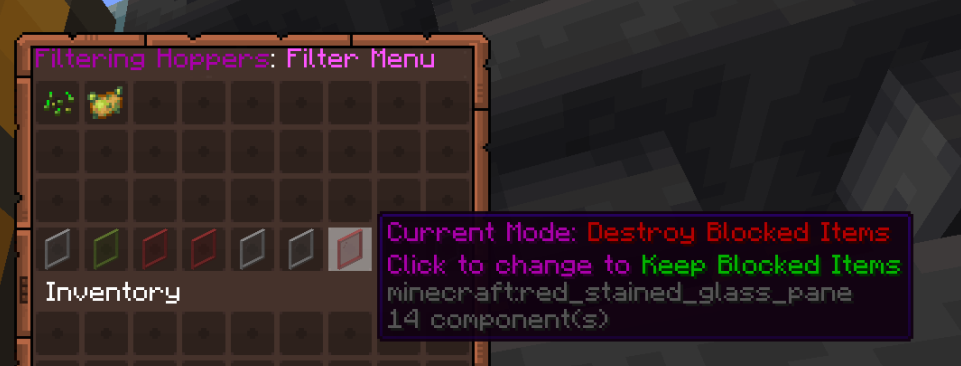
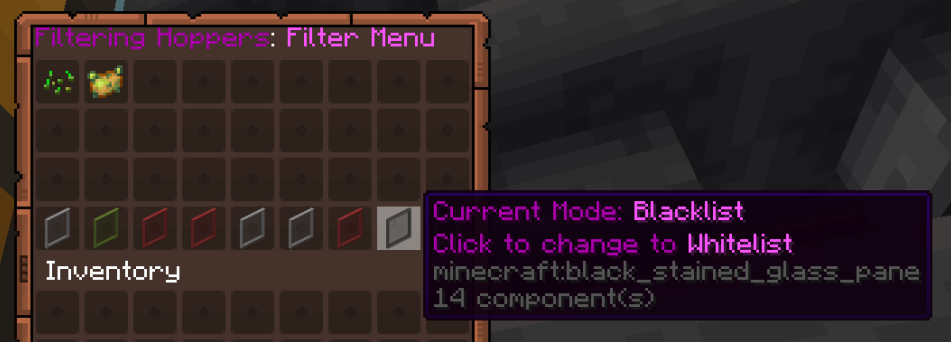
Filter Metadata Mode: - Setting the Filter to skip a chest using a null item that you have renamed in an Anvil (see example below).
Click the Glass Pane third from the left.
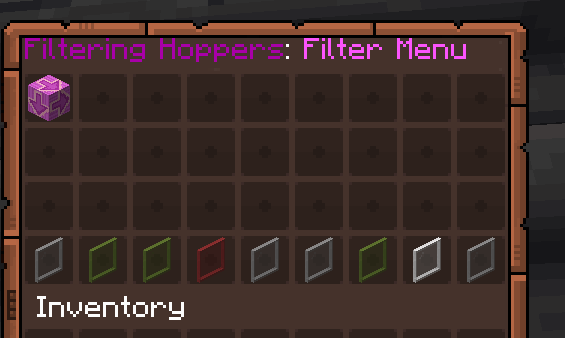
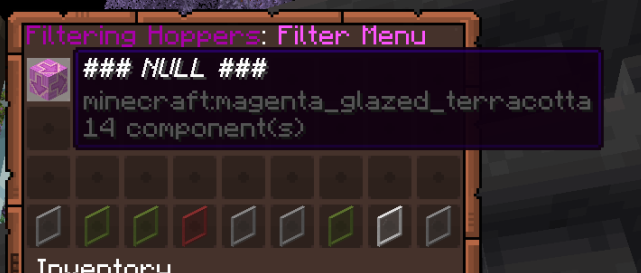
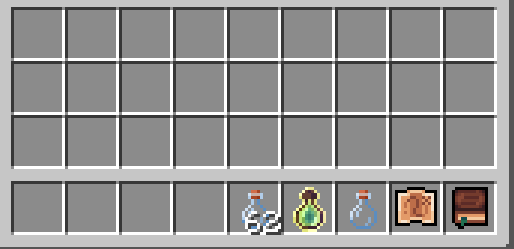
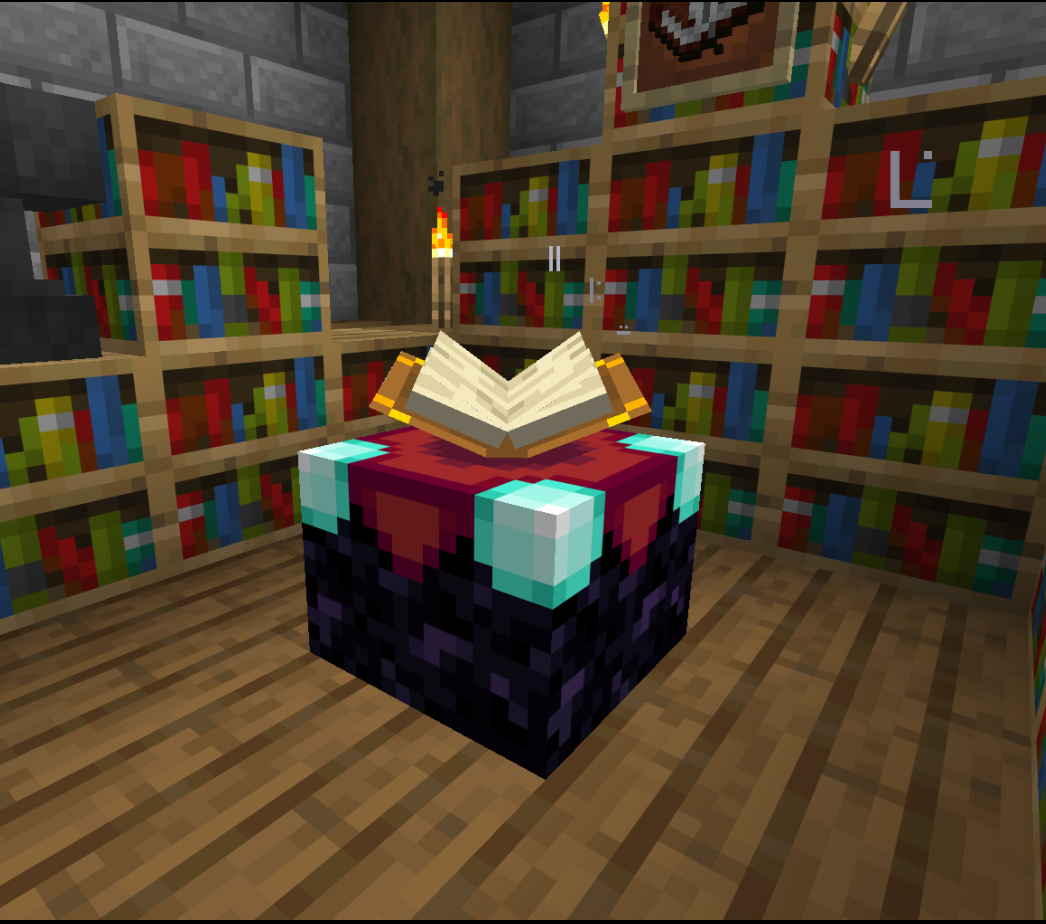
Players can bank Experience and heal Items with the Mending Enchantment in the following way.
Mending Items with the Mending Enchantment Using Player Experience Bar:
Experience Banking:
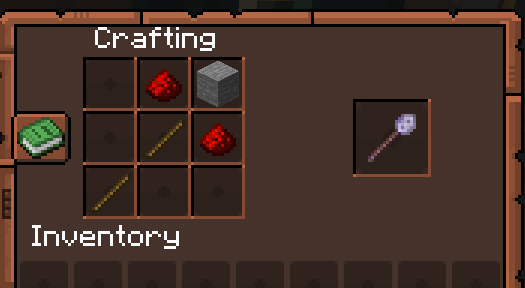
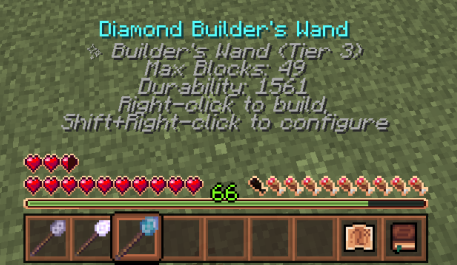
Builder's Wands are featured on our server to help players with repetitive block placement.
There are three (3) tiers of Builders Wands that players can craft. See images below for information and recipes.
Builder's Wand Tiers:
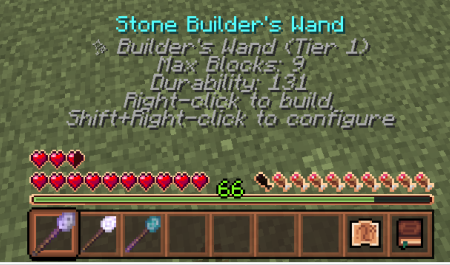
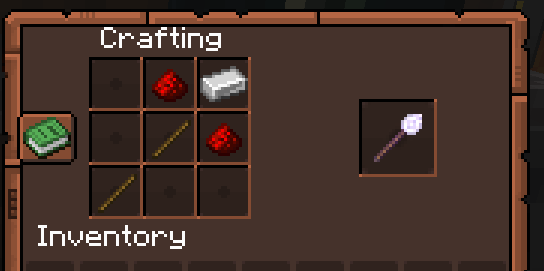
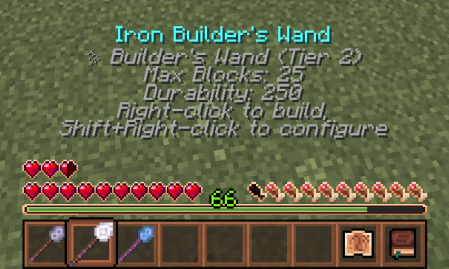
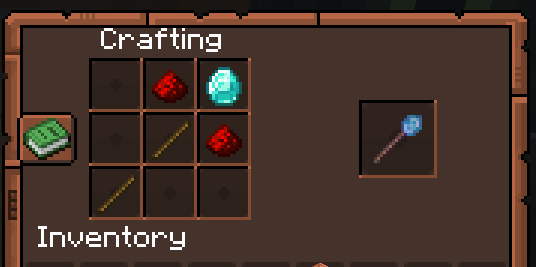
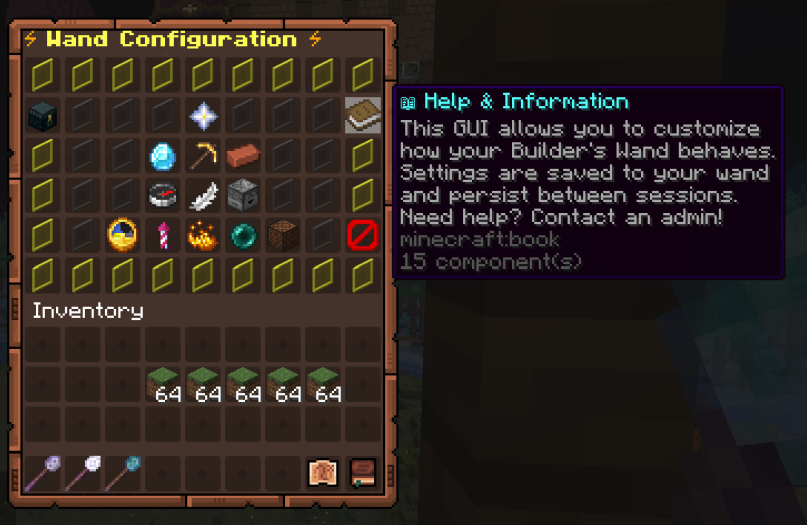
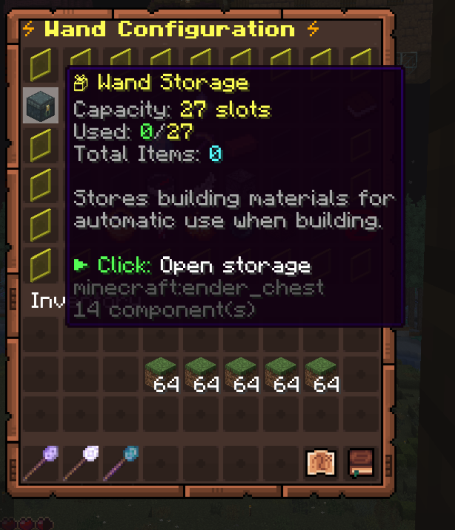
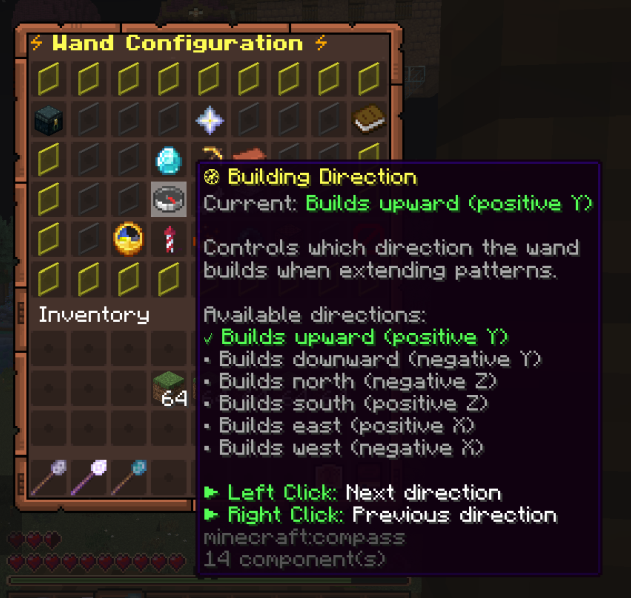
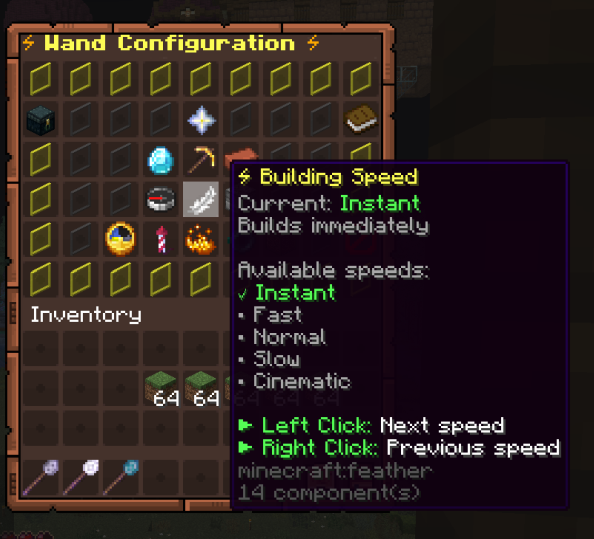
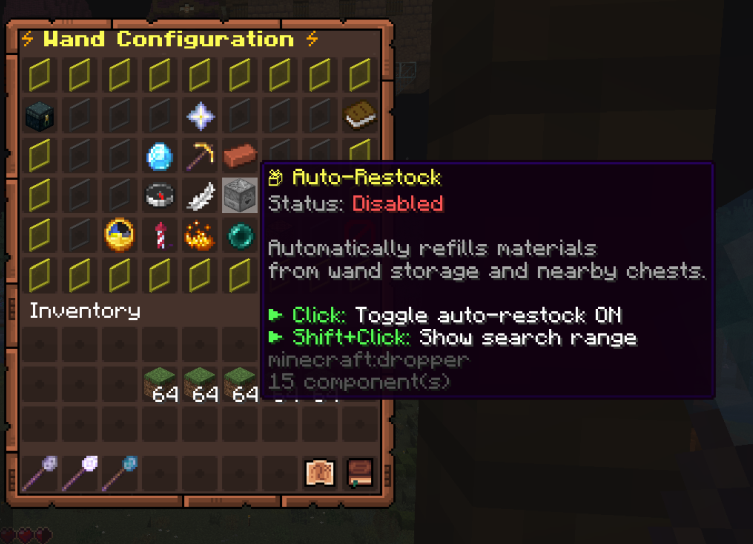
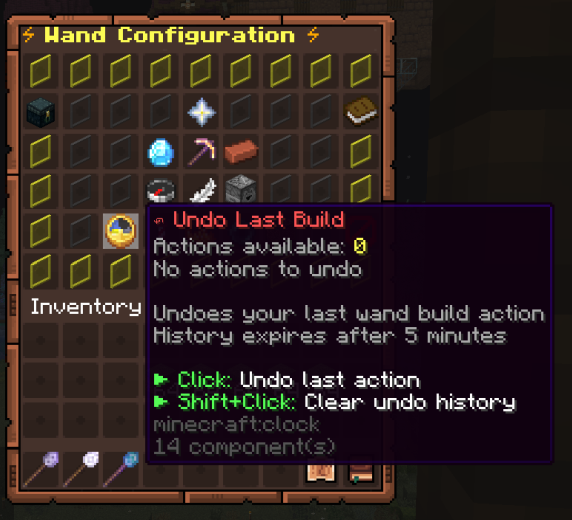
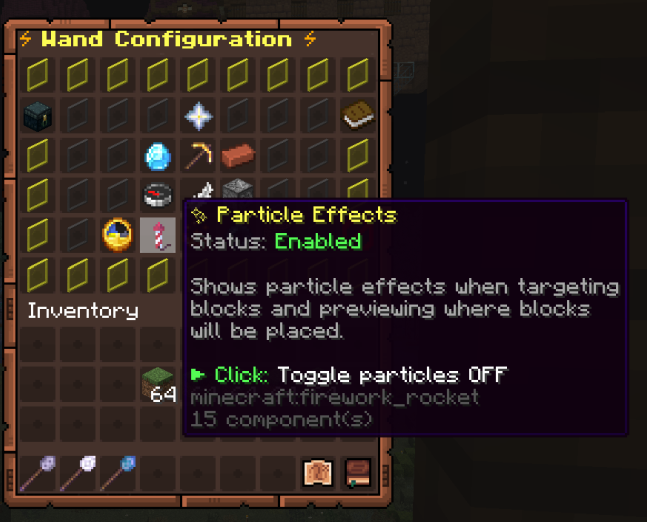
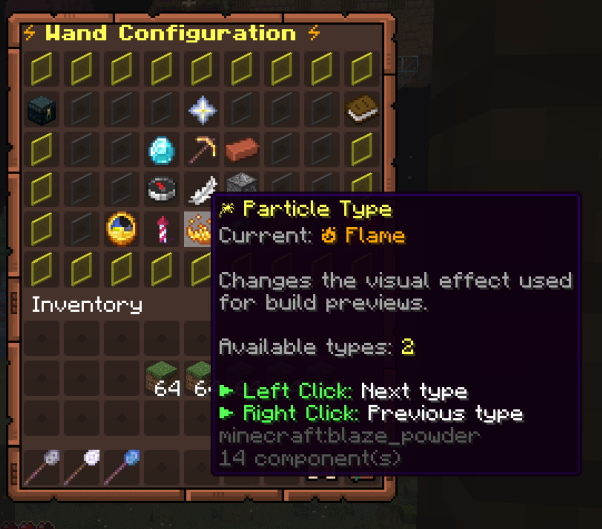
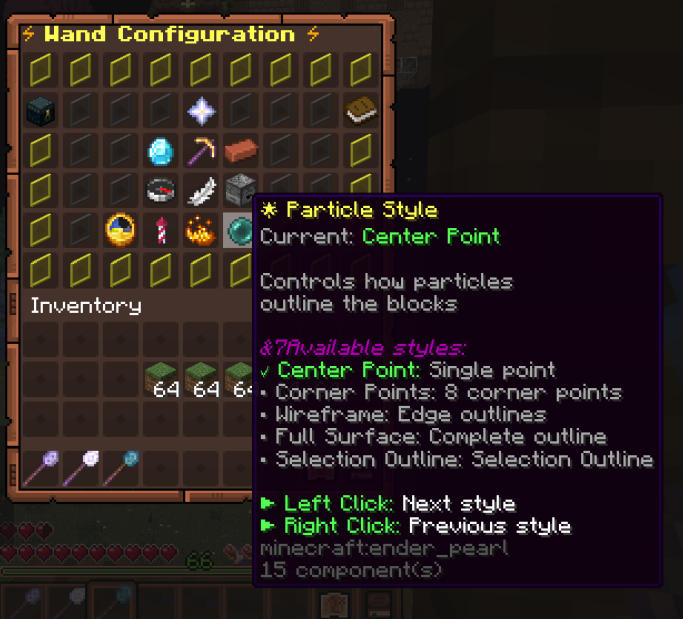
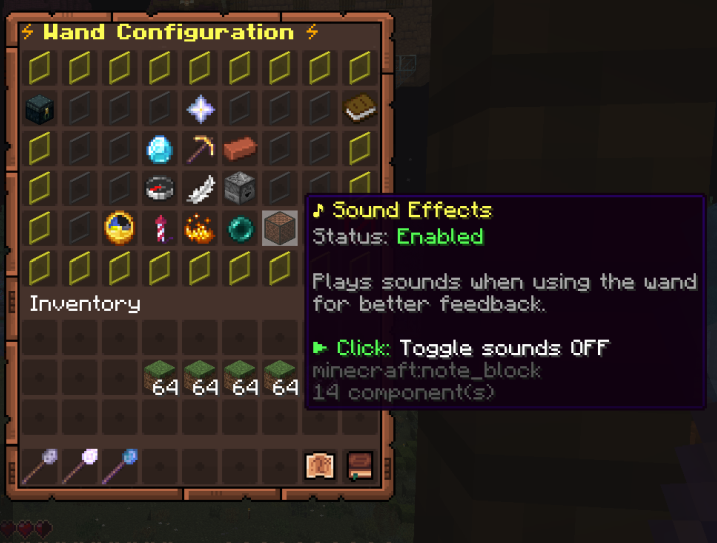
Wand Configuration GUI. See below for examples of each GUI Icon function.
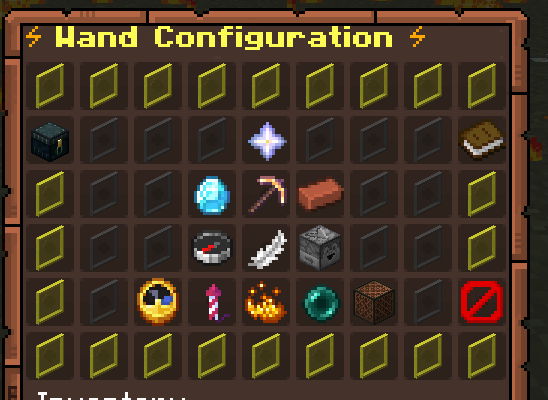
Builder's Wand GUI - Help
Builder's Wand GUI - Wand Storage
Builder's Wand GUI - Wand Information
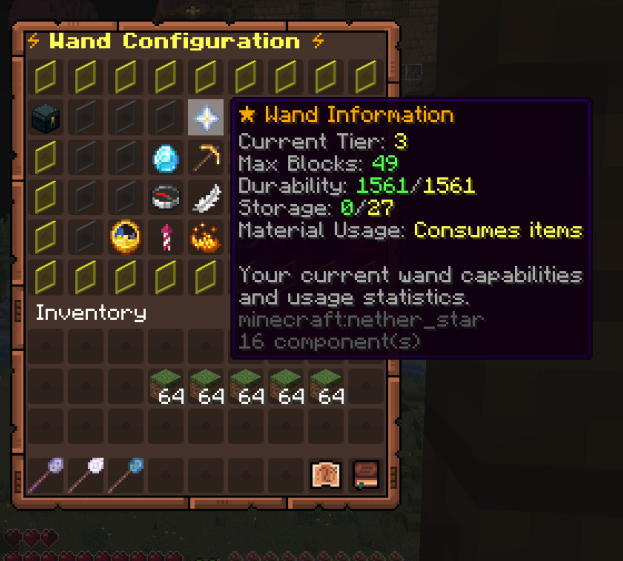
Builder's Wand GUI - Wand Tier
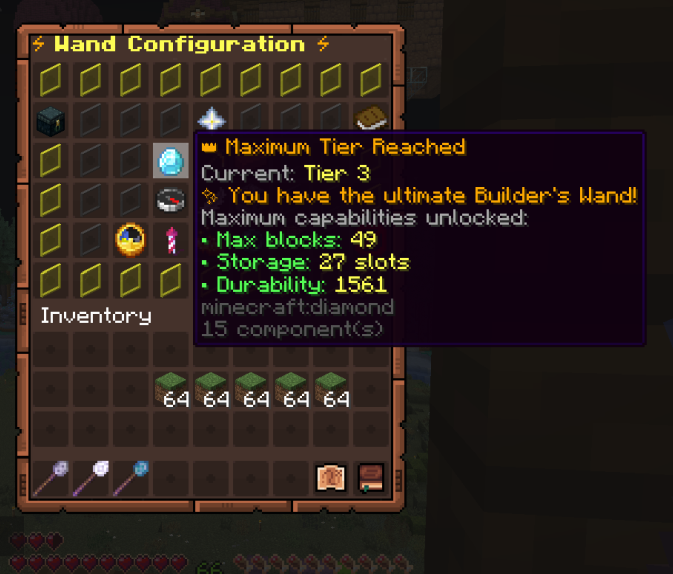
Builder's Wand GUI - Building Mode
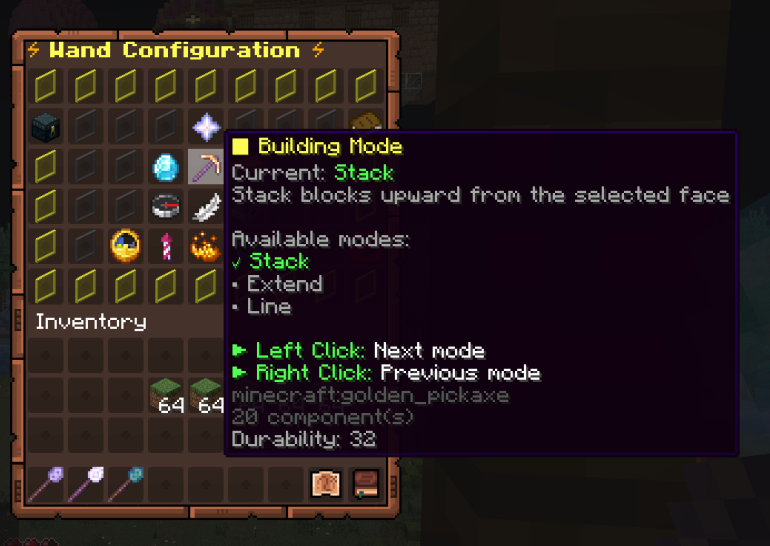
Builder's Wand GUI - Max Blocks per Use
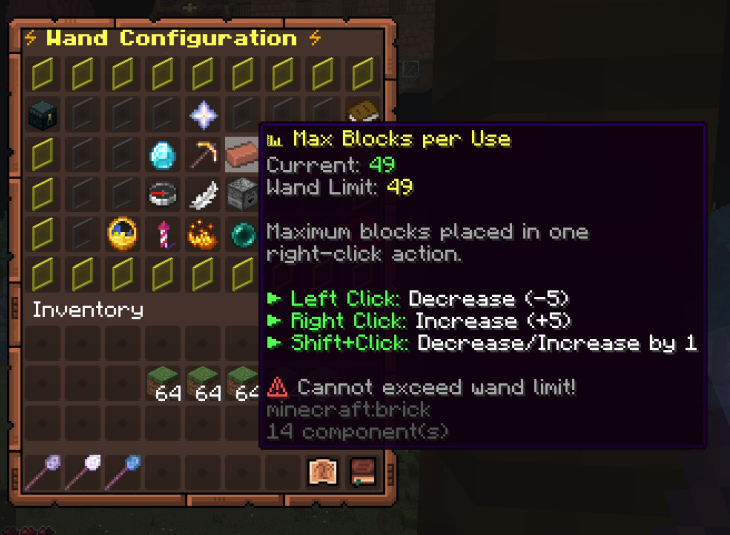
Builder's Wand GUI - Building Direction
Builder's Wand GUI - Building Speed
Builder's Wand GUI - Auto-Restock Toggle
Builder's Wand GUI - Undo
Builder's Wand GUI - Particle Effects Toggle
Builder's Wand GUI - Particle Effects Appearance (Flame or Redstone Dust)
Builder's Wand GUI - Particle Appearance Styles
Builder's Wand GUI - Sound Effect
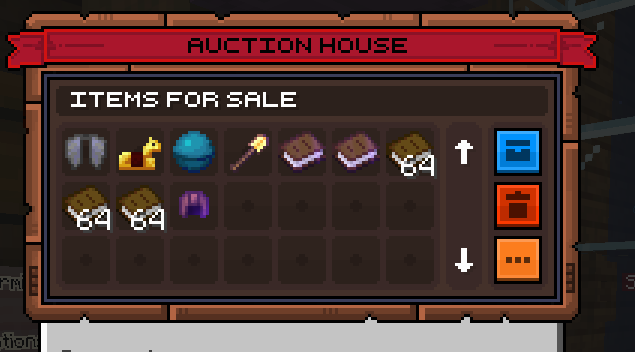
Players can post items for auction in the Auction House for other Players to bid on.
You can view all items you currently have for auction by pressing the blue "My Items" button on the GUI.
Expired items and withdrawn items can be found in the Auction House by pressing the red "Expired Items" button on the GUI.
If your inventory is full when you collect/buy an item, you can retrieve it from your Auction House Backpack by typing /ah open backpack.
How to list an item:
How to bid/buy on an item:
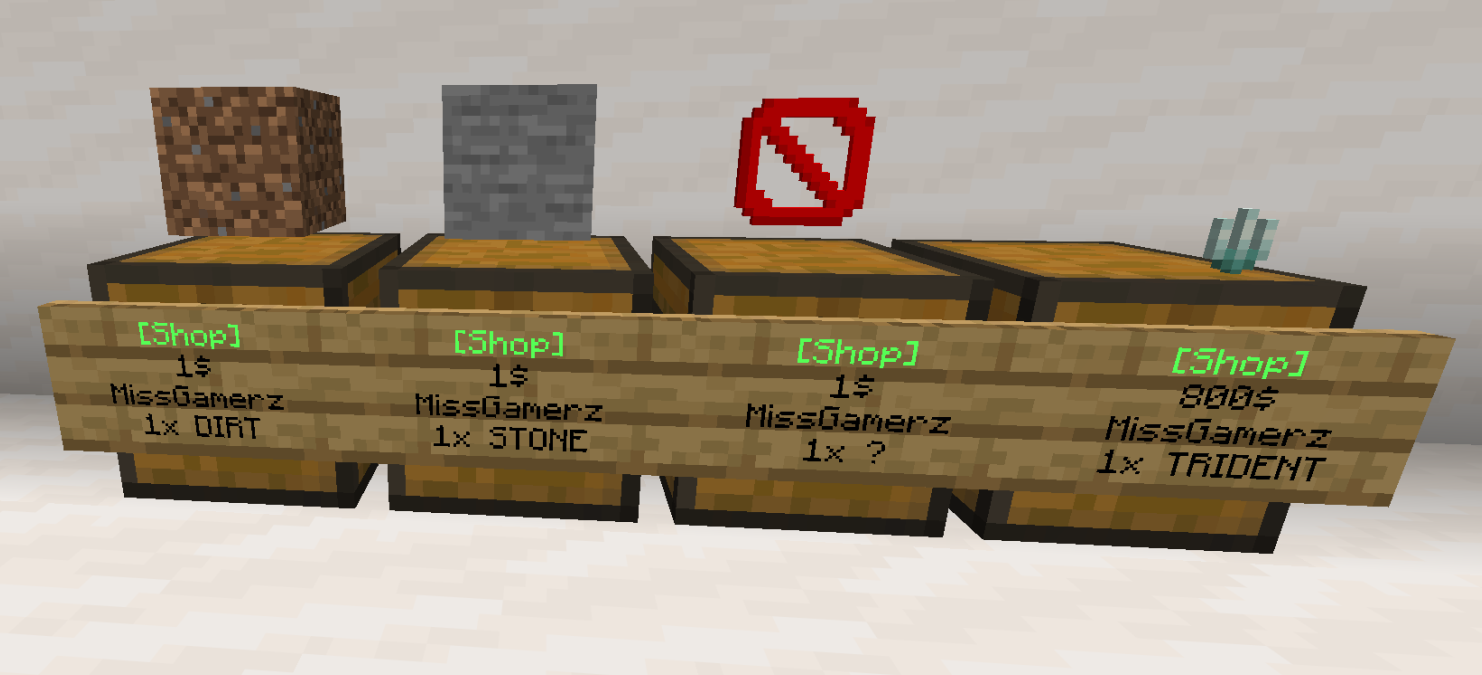
Player Shops have now been introduced to our server!
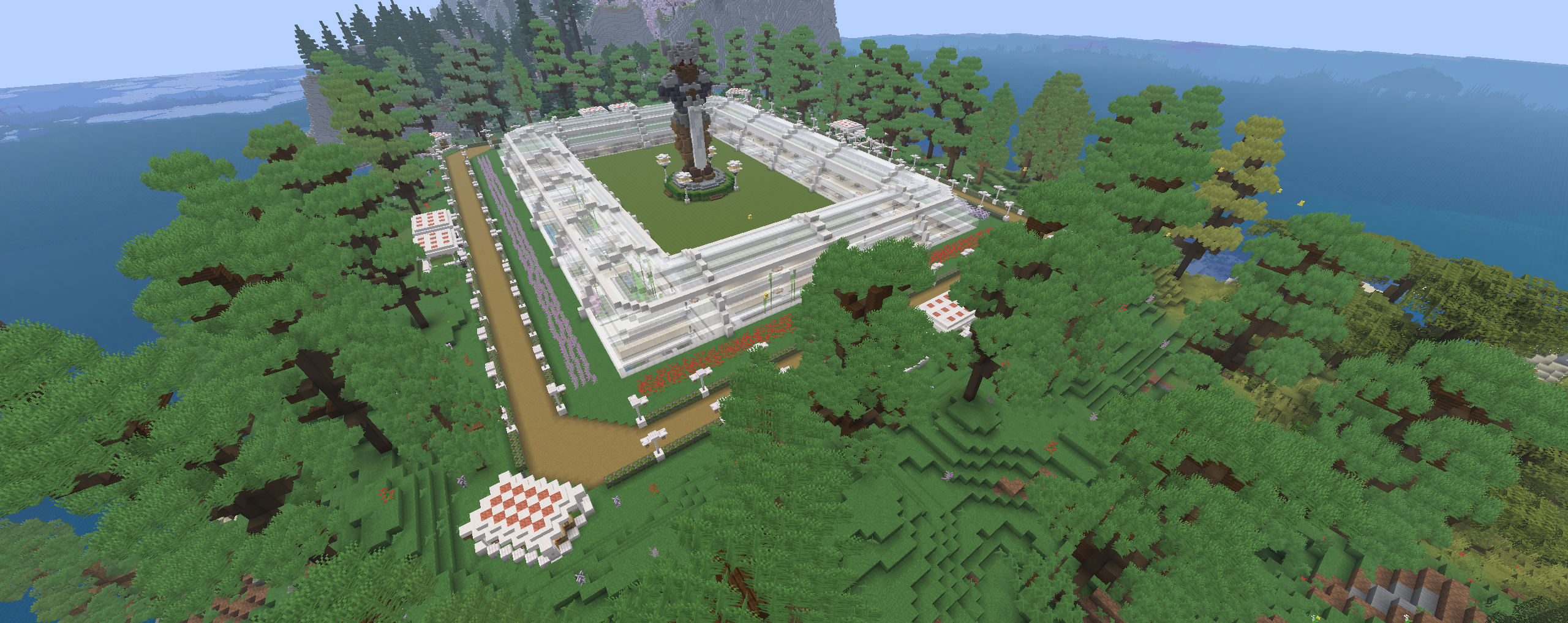
The Server Shopping Mall is in the overworld located in a separate world.
Warp command: /pw Mall
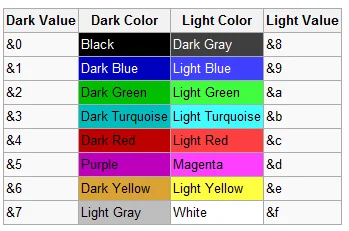
Nicknames are available to Players as follows:
NOTE: Offensive nicknames are not allowed and may warrant a temporary or permanent ban.
Examples:
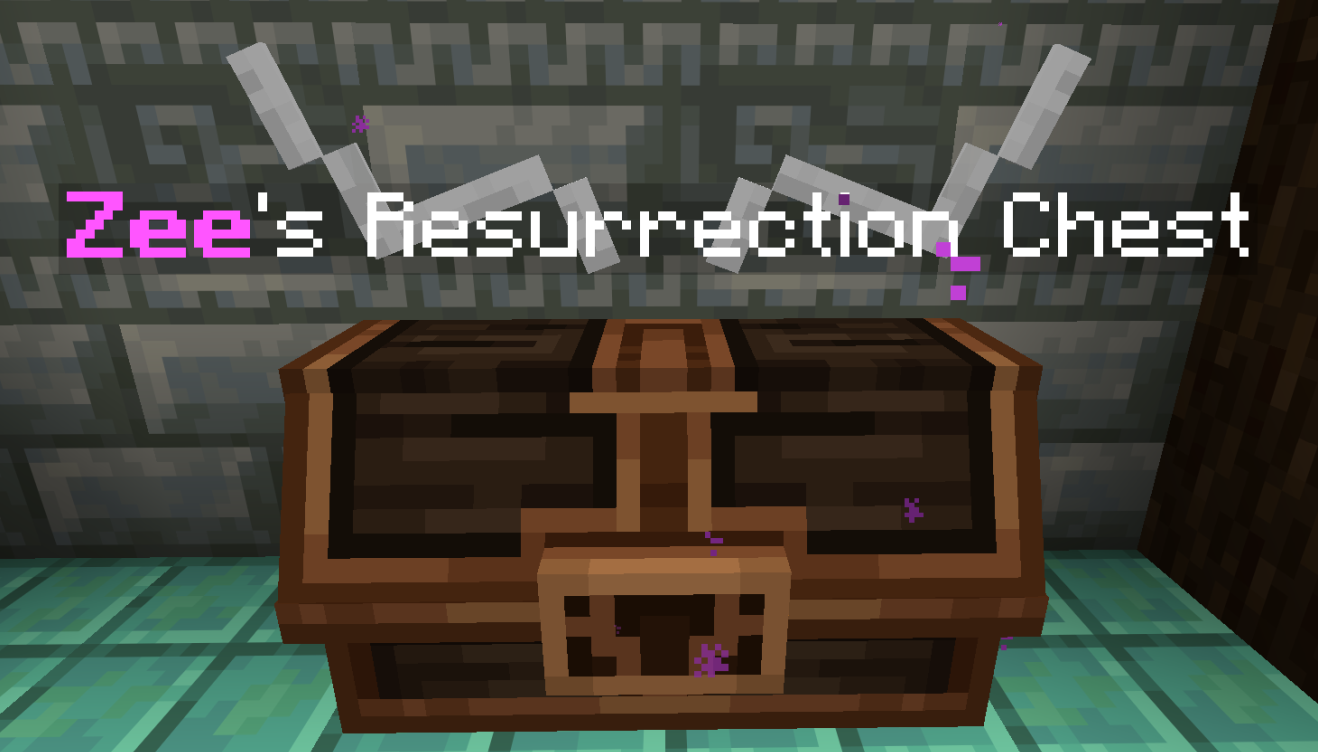
Before heading out in the overworld, make yourself a Resurrection Chest.
Your inventory will be saved to the chest on your death.
NOTE: We recommend that you completely empty your Resurrection Chest after every death. If it becomes full, it will begin to delete items the next time you die.
How to label the sign:
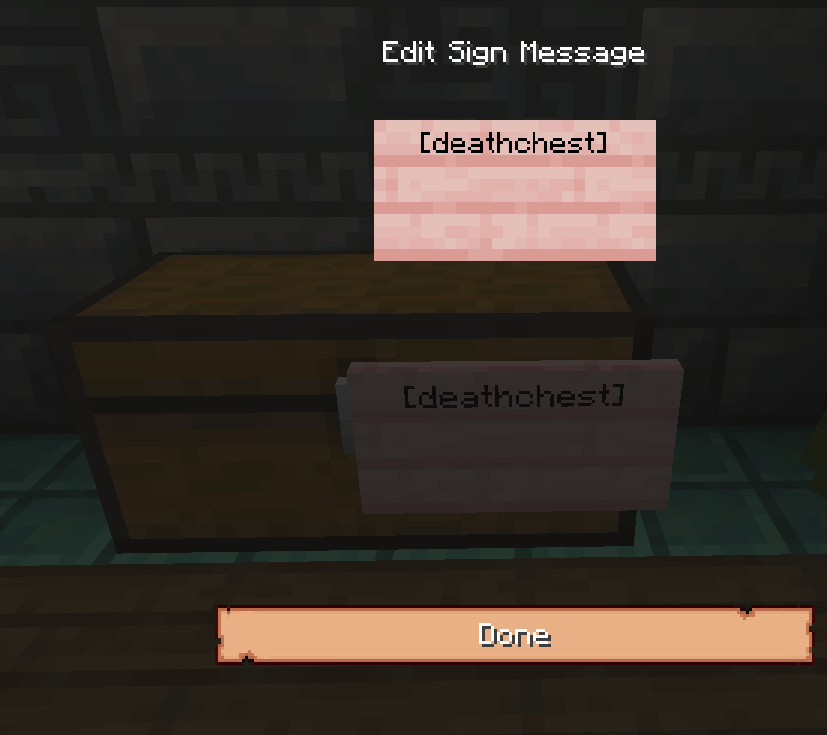
Resulting Resurrection Chest:
Players can extract Enchantments from items to a book, which can then be used to Enchant another item.
How to use the Enchantment Extractor:
Enchantment Extractor Recipe:
[Bottle o' Enchanting] [Block or Lapis Lazuli] [Bottle o' Enchanting]
[Block of Lapis Lazuli] [Book] {Block of Lapis Lazuli]
[Bottle o' Enchanting] [Block or Lapis Lazuli] [Bottle o' Enchanting]
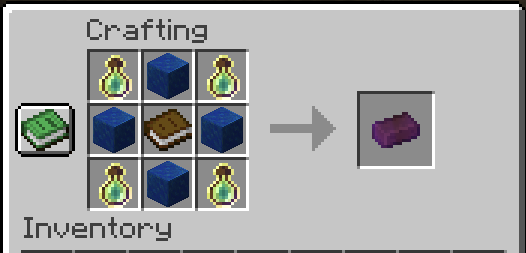
Enchantment Extractor GUI
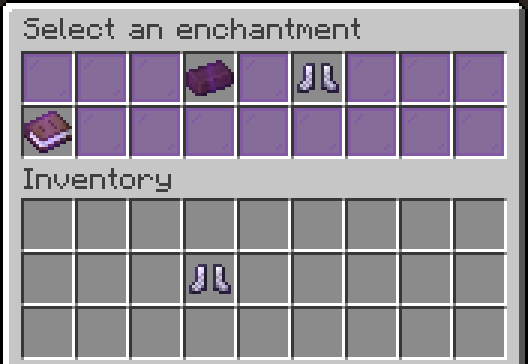
Enchantment Extractor Result

Enchantment Information
The Enchantments list below includes attributes that players can get in Survival mode.
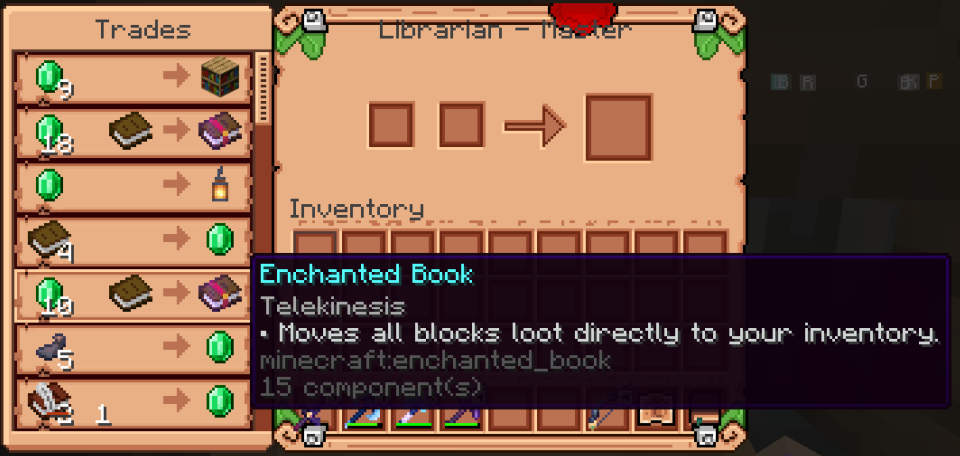
Enchantments can be found as books in Loot Chests or Loot Drops, Enchanting Table, Villagers, Coin or Crate Items as shown in the list below.
Some Enchantments are exclusive and not found on the Enchanting Table.
See additional entries in this section of the Wiki for lists of Enchantments for:
Definitions found on the above Wiki pages:
Enchantments - Armour
Definitions:
| Name | Summary | Incompatible With | Max Level | Primary Items | Secondary Items |
| Cold Steel | Applies Mining Fatigue effect to attacker. | III | Chest Plate | Elytra | |
| Darkness Cloak | Applies Darkness effect to attacker. | III | Chest Plate | Elytra | |
| Dragon Heart | Grants passive Health Boost effect. | V | Chest Plate | Elytra | |
| Elemental Protection | Reduces potion and elemental damage. | IV | Helmet, Chest Plate, Leggings, Boots | ||
| Fire Shield | Ignites attacker. | IV | Chest Plate | Elytra | |
| Flame Walker | Ability to walk on lava, immunity to magma damage. | Frost Walker | II | Boots | |
| Hardened | Grants Resistance effect on receiving damage. | II | Chest Plate | Elytra | |
| Ice Shield | Freezes and slows down attacker. | III | Chest Plate | Elytra | |
| Jumping | Grants Jump Boost effect. | II | Boots | ||
| Kamikadze | Creates an explosion on death. | III | Chest Plate | Elytra | |
| Lightweight | Allows you to safely jump on turtle eggs, farmlands and big Dripleaf. | I | Boots | ||
| Night Vision | Grants Night Vision effect. | I | Helmet | ||
| Rebound | Gives the effect of landing on a Slime Block . | Feather Falling | I | Boots | |
| Regrowth | Restores certain amount of hearts over time. | IV | Chest Plate | Elytra | |
| Speed | Grants Speed effect. | II | Boots | ||
| Stopping Force | Reduces Knockback when getting damage. | III | Leggings |
Enchantments - Bow
Definitions:
| Name | Summary | Incompatible With | Max Level | Primary Items | Secondary Items |
| Confusing Arrows | Applies Nausea effect on arrows. | Bomber, Ender Bow, Ghast | III | Bow | Crossbow |
| Darkness Arrows | Applies Darkness effect on arrows. | Bomber, Ender Bow, Ghast | III | Bow | Crossbow |
| Dragonfire Arrows | Applies Dragon's Breath effect on arrows. | Bomber, Ender Bow, Ghast | III | Bow | Crossbow |
| Electrified Arrows | Summons Lightning on hit. | Bomber, Ender Bow, Ghast | III | Bow | Crossbow |
| Ender Bow | Shoots Ender Pearls instead of arrows. | Bomber, Ghast | I | Bow | Crossbow |
| Explosive Arrows | Arrows Explodes on hit. | Bomber, Ender Bow, Ghast | III | Bow | Crossbow |
| Flare | Places a Torch where arrow land. | Bomber, Ender Bow, Ghast | I | Bow | Crossbow |
| Ghast | Shoots Fireball instead of arrows. | Bomber, Ender Bow | I | Bow | Crossbow |
| Hover | Applies Levitation effect on arrows. | Bomber, Ender Bow, Ghast | III | Bow | Crossbow |
| Lingering | Arrows with a lingering effect on hit. | Bomber, Ender Bow, Ghast | III | Bow | Crossbow |
| Poisoned Arrows | Applies Poison effect on arrows. | Bomber, Ender Bow, Ghast | III | Bow | Crossbow |
| Sniper | Increases projectile speed. | II | Bow | Crossbow | |
| Vampiric Arrows | Restores health on hit. | Bomber, Ender Bow, Ghast | III | Bow | Crossbow |
| Withered Arrows | Applies Wither effect on arrows. | Bomber, Ender Bow, Ghast | III | Bow | Crossbow |
Enchantments - Tools
Definitions:
| Name | Summary | Incompatible With | Max Level | Primary Items | Secondary Items |
| Blast Mining | Mines blocks with Explosions . | Tunnel, Veinminer | V | Pickaxe | |
| Haste | Applies Haste effect on mining. | III | Pickaxe, Axe, Shovel | Hoe, Shears | |
| Replanter | Replants Crops on harvest or right-click. | I | Hoe | ||
| Silk Spawner | Chance to mine a Spawner | I | Pickaxe | ||
| Veinminer | Mines the whole ore vein at once. | Tunnel, Blast Mining | III | Pickaxe |
Enchantments - Fishing
Definitions:
| Name | Summary | Incompatible With | Max Level | Primary Items | Secondary Items |
| Auto Reel | Automatically reels in a hook on bite. | 1 | Fishing Rod | ||
| Curse of Drowned | Chance to fish up a Drowned . | 3 | Fishing Rod | ||
| Double Catch | Increases amount of caught item by x2. | 3 | Fishing Rod | ||
| River Master | Increases casting distance. | 5 | Fishing Rod | ||
| Seasoned Angler | Increases amount of gained XP . | 3 | Fishing Rod | ||
| Survivalist | Automatically cooks fish if what is caught is raw. | 1 | Fishing Rod |
Enchantments - Weapon
Definitions:
| Name | Summary | Incompatible With | Max Level | Primary Items | Secondary Items |
| Bane of Netherspawn | Increases damage to nether mobs . | V | Sword | Axe | |
| Blindness | Applies Blindness effect on target. | II | Sword | Axe | |
| Confusion | Applies Nausea effect on target. | II | Sword | Axe | |
| Cure | Cures Zombified Piglins and Zombie Villagers on kill. | III | Sword | Axe | |
| Curse of Death | If you kill a player, you have a chance of dying too. | III | Sword | Axe | |
| Decapitator | Allows to obtain target's head. | II | Sword | Axe | |
| Double Strike | Increases damage by twice. | II | Sword | Axe | |
| Exhaust | Applies Hunger effect on target. | IV | Sword | Axe | |
| Ice Aspect | Freezes and applies Slowness on target. | III | Sword | Axe | |
| Infernus | Tridens sets targets on fire. | III | Trident | ||
| Paralyze | Applies Mining Fatigue effect on target. | V | Sword | Axe | |
| Rage | Grants Strength effect in combat. | II | Sword | Axe | |
| Temper | Damage increases the more the less health you have. | V | Sword | Axe | |
| Thunder | Summons Lightning on target with extra damage. | V | Sword | Axe | |
| Vampire | Steals target's health. | III | Sword | Axe | |
| Venom | Applies Poison effect on target. | II | Sword | Axe | |
| Village Defender | Increases damage to Illagers . | V | Sword | Axe | |
| Wisdom | Produces more XP from mobs. | V | Sword | Axe | |
| Wither | Applies Wither effect on target. | II | Sword | Axe |
Enchantments - Universal
Definitions:
| Name | Summary | Incompatible With | Max Level | Primary Items | Secondary Items |
| Curse of Breaking | Takes more durability points on use. | Unbreaking | III | Pickaxe, Axe, Shovel, Hoe, Sword, Bow, Crossbow, Shears, Helmet, Chest Plate, Leggings, Boots, Elytra, Shield, Fishing Rod, Trident, Mace | |
| Curse of Fragility | Prevents item from being grindstoned or anviled. | I | Pickaxe, Axe, Shovel, Hoe, Sword, Bow, Crossbow, Shears, Helmet, Chest Plate, Leggings, Boots, Elytra, Shield, Fishing Rod, Trident, Mace | ||
| Curse of Mediocrity | Disenchants block's and mob's loot. | III | Sword, Axe, Bow, Crossbow, Trident, Mace | Pickaxe, Shovel, Hoe, Shears | |
| Curse of Misfortune | Reduces block's and mob's loot to zero. | Fortune , Looting | III | Pickaxe, Axe, Shovel, Hoe, Sword, Bow, Crossbow, Shears, Trident, Mace | |
| Soulbound | Prevents item from being dropped upon death. | Curse of Vanishing | I | Pickaxe, Axe, Shovel, Hoe, Sword, Bow, Crossbow, Shears, Helmet, Chest Plate, Leggings, Boots, Elytra, Shield, Fishing Rod, Trident, Mace |